Wi-Fi Operator Overview
Navigating to the Wi-Fi Operator profiles
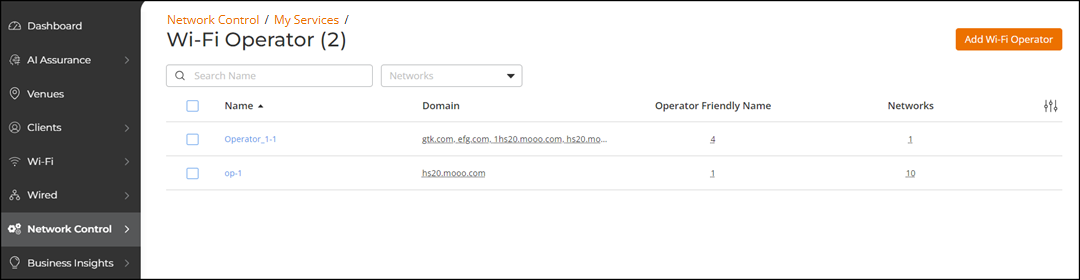
tile allows you to view the following information about all the Wi-Fi operators
associated with your RUCKUS One account. The information is displayed in table format, reflecting a
default subset of columns. You can control which information is included and excluded
by
clicking the  icon and selecting or deselecting column names in the
drop-down list.
icon and selecting or deselecting column names in the
drop-down list.
You can customize which fields appear in
the Wi-Fi Operator table by clicking the icon and
selecting or deselecting the desired column names. Optionally, you can click Reset to default to have
the default subset of columns appear in the Wi-Fi Operator
table.
You can search the results using the Search field. Enter the Wi-Fi operator name in the Search field. All matching Wi-Fi operators are displayed.
You can filter the list of Wi-Fi operators by selecting a specific Hotspot 2.0 Access network from the Networks drop-down list. When any filter is being used, a Clear Filters button appears, allowing for a quick reset to the full list of all Wi-Fi operators.