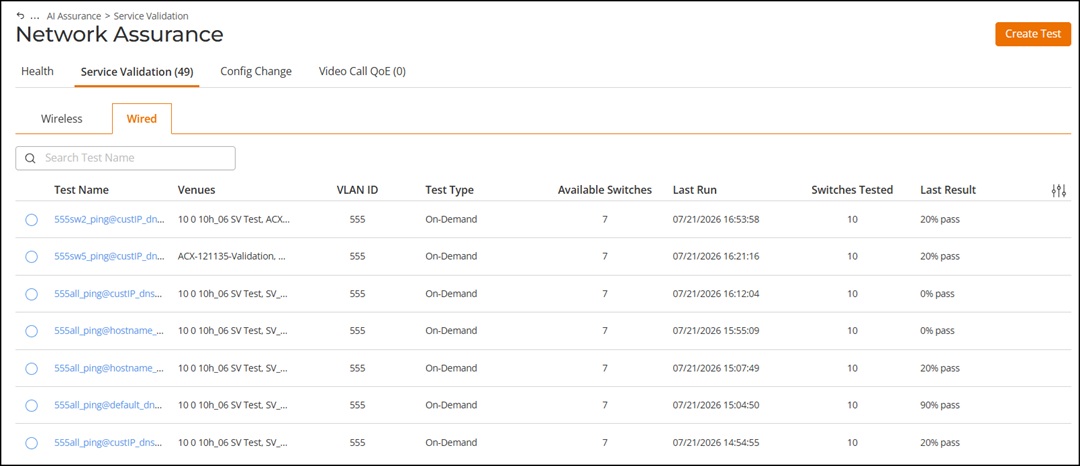
Accessing Wired Service Validation
The Wired Service Validation page
allows you to view, monitor, and manage configured service validation tests for
switches.
This page provides a summary of test configurations, execution history, and
results.
- On the navigation bar, select . The Service Validation page is displayed, defaulting to the Wireless sub-tab.
- Select the tab.
The table displays the configured wired service validation tests with the following columns:
- Test Name: Displays the name of the service validation test.
- Venues: Displays the venue that contain the switches selected for the service validation test.
- VLAN ID: Displays the client VLAN on which the test is configured.
- Test Type: Displays how the test is scheduled, such as On-Demand, Daily, Weekly, or Monthly.
- Available Switches: Displays the number of switches that are currently eligible to run the service validation test based on the configured switch selection and client VLAN.
- Last Run: Displays the date and time when the test was last executed.
- Switches Tested: Displays the number of switches on which the service validation test was initiated.
- Last Result: Displays the outcome of the most recent test execution (as a pass percentage of the total tests).