Viewing the Migrated ZoneDirector Radio and Channel Configuration
After ZoneDirector AP migration, you can
view the migrated ZoneDirector radio and channel configuration in RUCKUS One.
- From the menu, click Venues. In the Venues table, select the check box next to the Venue Name and click Edit. Alternately, click the Venue Name and click Configure.
- To view the migrated AP radio
and channels configuration of a venue, go to .Can the user disable Use same channels for indoor and outdoor APsoption in R1 after migration?Can the user configure the following settings in R1 after migration?
- Channel selection method: Allows automatic radio channel selection using Background Scanning or ChannelFly. The option selected in ZoneDirector is migrated and retained in RUCKUS One. Refer to the following RUCKUS Networks Education YouTube videos for explanations of how these channel selection methods work:
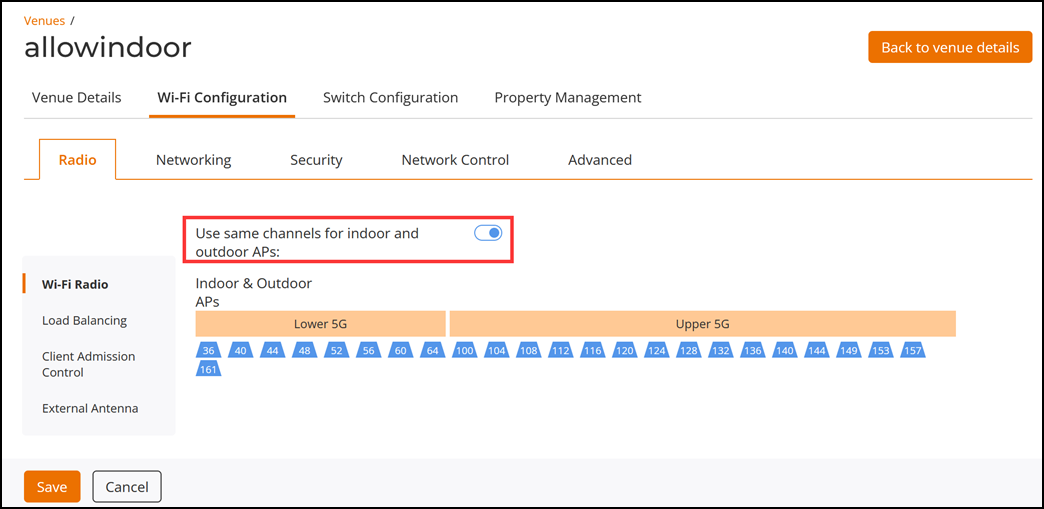
- Use same channels for indoor and outdoor APs: Allows to configure outdoor APs to use channels regulated as indoor-only. This option is available for the 5-GHz radio only. This option is migrated and enabled in RUCKUS One only when the Allow indoor channels option is enabled in ZoneDirector.
- To view the migrated AP radio
settings for an AP, view the AP in configuration mode. From the menu, click
. In the Access Points table, click the
check box next to the name of the desired AP and click
Edit. Alternately, click the specific AP name and
click Configure. Click the Radio
tab to view the Wi-Fi Radio settings. Click each
band-specific sub-tab to view the radio settings.Can the user configure the following settings in R1 after migration?
- Channel selection
method: Sets the channel selection method used by the AP
radio to optimize throughput and mitigate interference.
- Auto: Allows automatic radio channel selection using Background Scanning or ChannelFly. After migration, RUCKUS One retains the channel selection made in ZoneDirector.
- Manual: Allows manual radio channel selection. If you selected Manual in ZoneDirector, then after migration Manual channel selection is selected in RUCKUS One. Refer to the following RUCKUS Networks Education YouTube videos for explanations of how these channel selection methods work:
- Bandwidth: Sets the channel bandwidth of each channel in the spectrum used during transmission. After migration, RUCKUS One retains the bandwidth selection made in ZoneDirector. Displays the bandwidth that was selected in ZoneDirector. Refer to Migration of ZoneDirector Radio and Channel Configuration to RUCKUS One table for more information.
- Transmit Power adjustment: Allows you to manually set the transmit power on all 2.4 GHz or 5 GHz radios (default is Auto). Refer to Migration of ZoneDirector Radio and Channel Configuration to RUCKUS One table for information on migration.
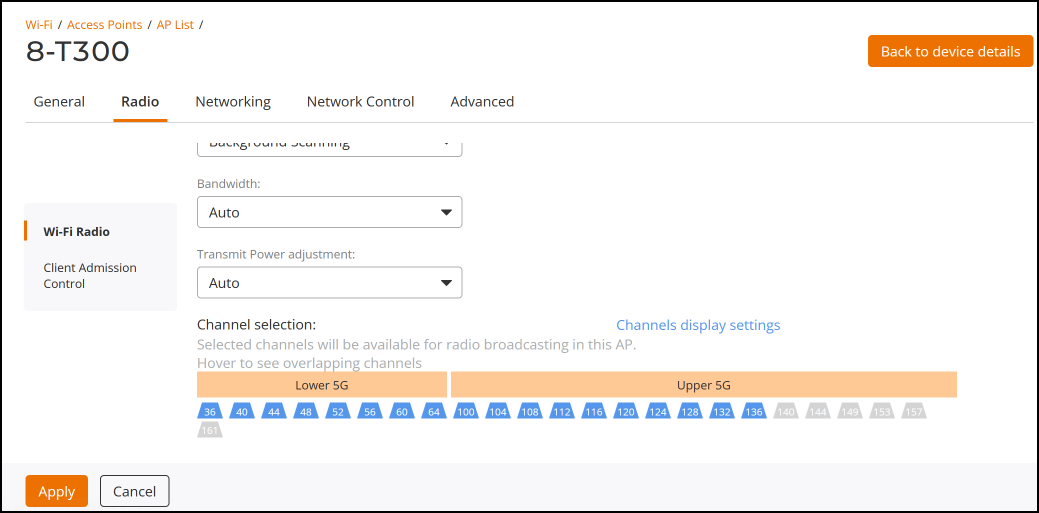
- Channel selection: Allows you to manually configure the channels on which to broadcast by deselecting any channels that you do not want to use. RUCKUS One retains the channel selection after migration, including the 5.8 GHz channels. The radio channels that were enabled in ZoneDirector will appear in blue after migration, else will be grayed out. In a scenario where the channels enabled on ZoneDirector are not supported in RUCKUS One, then those channels will not be migrated to RUCKUS One.
After migration to RUCKUS One, the user can configure the migrated radio and channel configuration settings in RUCKUS One.
Note: If your ZoneDirector country code is set to United Kingdom, an additional Enable 5.8 GHz Channels option will be available, and an additional "5.8 GHz Channels License" option will be available for outdoor APs. Enabling the 5.8 GHz Channels option allows the use of restricted C-band channels. These channels are disabled by default and must only be enabled by customers with a valid license to operate on these restricted channels. Enabling the 5.8 GHz Channels License option for outdoor APs will allow outdoor APs to use full power in 5.8 GHz channels. You can configure the 5.8 channels for outdoor ZoneDirector APs only from the ZoneDirector web interface (). - Channel selection
method: Sets the channel selection method used by the AP
radio to optimize throughput and mitigate interference.