Adding a Stack
A switch stack forms a single logical
switch from multiple ICX units and determines unified management, role election
(Active/Standby/Member), and high‑availability forwarding for the stack in RUCKUS One.
Note: Stacking support
varies by ICX family and firmware. The supported models for Stacking are:
Complete the following steps to add a stack:- All members must be from the same ICX family (for example, ICX 7150, ICX 7550, ICX 7650, ICX 7850, ICX 8100, or ICX 8200); different models within that family can be stacked (for example, ICX8200‑24FX with ICX8200‑48PF).
- ICX 7150: ICX 7150 stacks support up to eight units. Models –C08P, –C08PT, and –ES do not support stacking. When present, Module 3 ports must be configured as 10 Gbps for stacking; 1 Gbps is not supported for stack ports.
- ICX 7550 / ICX 7650 / ICX 7850: These families are stack‑capable ICX families.
- ICX 7550 / 7650 / 7850: Stacking supported; limits per platform guides.
- ICX 8100‑X: Stacking is supported on
10.0.10h and later, with a maximum of four units per stack. For firmware
versions earlier than 10.0.10h, stacking functionality is limited or
unavailable. Only the Router image is supported. Breakout ports and OSPF
configuration are not supported.
ACX-93833 Support ICX8100-X - Stacking on R1
- ICX 8100 (non‑X): Stacking is not supported
on any ICX 8100 (non‑X) model.
ACX-93833 Support ICX8100-X - Stacking on R1
- ICX 8100‑AV models must run a supported Router image and do not support stacking on non‑X hardware.
- ICX 8200 (including ICX 8200‑AV and non‑AV
models): Stacking is supported where applicable. Only the Router image is
supported. Breakout ports are not supported on ICX 8200 non‑AV models,
including ICX8200‑24XP2 and ICX8200‑48NP2. ICX 8200‑AV models appear in
stacks using their exact AV model identifiers.
ACX-116774 - Support ICX 8200 phase 3. Deleted "ICX 8200 (including ICX8200‑AV): Stacking is supported; AV SKUs display their exact AV identifiers in member listing.
- ICX 8200‑AV models onboard the same way as
standard ICX8200 devices and appear in stacks with their exact AV model
identifiers.
ACX-108409- R1 support for Phase 1 AV Switche
Refer to Supported ICX 8100 and ICX 8200 Series Switch Models for more details.
- Licensing: Each member requires a device license; 10G licenses may be required for stacking depending on family.
- On the navigation bar, select
. The Switch List page is displayed.
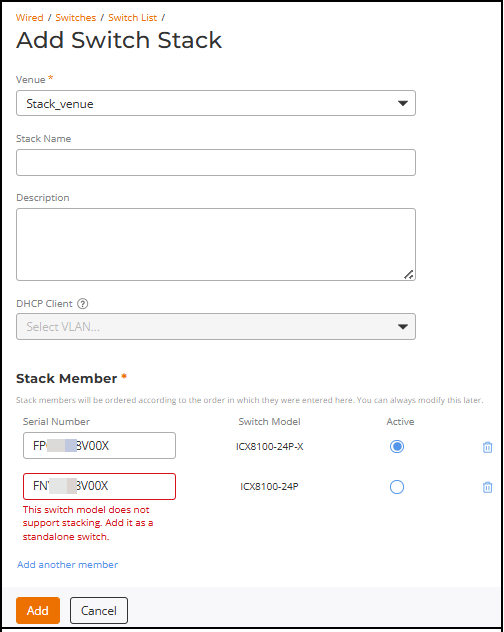
- Click Add in the upper-right corner of the Switch List page and select Switch Stack from the drop-down menu.
- Select Venue.
- (Optional) Enter Stack Name and Description to identify the stack.
- (Optional) Select a VLAN from the DHCP Client drop-down
list.Note: The DHCP client interface VLAN is only applied to switches having factory default settings. To prevent disconnections, switches with existing configurations are not affected by this setting.Note: This setting does not apply to already configured switches and is unavailable for some models (for example, ICX 8100 during onboarding).
- Complete the following in the Stack Member
section:
- Enter the 11‑digit Serial Number for each member
in the order you want them added.Note: If a serial is incomplete or nonexistent, the field shows Serial number is invalid. Each unit requires a device license; some families require 10G licenses for stacking.
- Set the Active unit by selecting the radio button to choose the initial active member (you can modify later).
- Enter the 11‑digit Serial Number for each member
in the order you want them added.
- (Optional) Stack with 40G ports on module 3: Enable this option to connect multiple switches using 40G ports on module 3 (if supported).
- (Optional) Click Add another member to add more switches to the stack.
- Click Add to add a stack.
- (Optional) Transform two or more standalone switches that are from the same model family, located in the same venue, and in the Operational state.
 icon to see members; roles (