Viewing Switch Clients
You can view the information about the
clients that are associated with an ICX switch. The information includes hostname,
operating
system (OS), IP address, model name, MAC address, client description, ports, and
VLAN, and
device type.
Note: The DHCP client visibility feature,
that displays OS, IP address, and model name, is supported only on ICX switch
firmware version 10.0.10c or higher.
- On the navigation bar, click
.
Navigation changed
- Click on the Switch
Name in the Switch column and click
Clients. Alternatively, from the navigation bar,
click and then click on the name of the client.The Clients page is displayed.
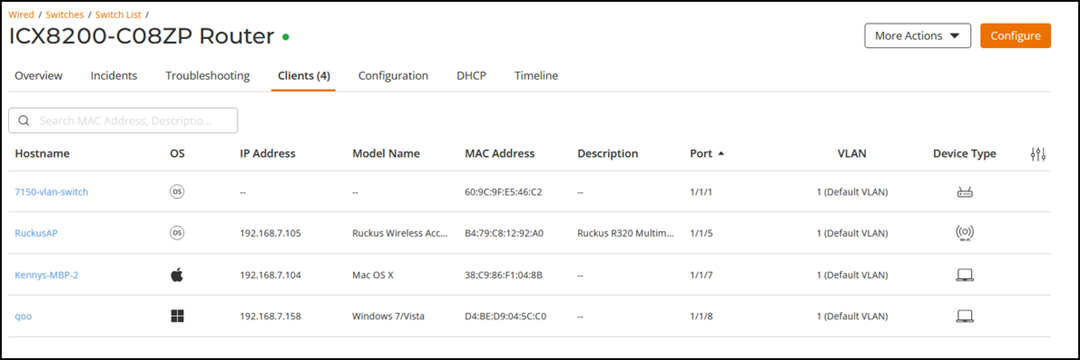
The Client page displays the following information:
Note: For OS and Device Type, if no data found, RUCKUS One displays the default image. For IP Address and Model Name, if no data found, RUCKUS One displays "--".- Hostname: Displays the hostname.
- OS: Displays the operating system of the client.
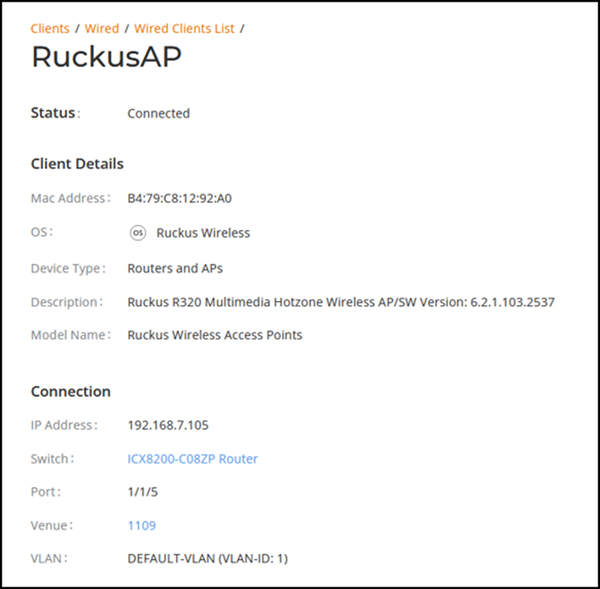
- MAC Address: Displays the MAC address of the client.
- IP Address: Displays the IP address of the switch.
- Description: Displays information about the client.
- Venue: Displays the name of the venue.
- Switch: Displays the switch information.
- Port: Displays the switch port numbers.
- VLAN: Displays the VLAN ID.
- Device Type: Displays the device type: a router or an AP.
- Model Name: Displays the AP model.