Generating Certificates for Multiple Identities
Note: The
Generate Certificate option is available only on the
Identity Group Details page, where all identities belong to the same identity group
and share the required certificate configuration. It is not available on the
Identities page, which lists identities from multiple identity
groups.
Note: You can select up to 100 identities at a
time in a single request, and all selected identities must belong to the same
identity group.
Complete the following steps to generate certificates for
multiple identities:- On the navigation bar, select .
- Click the Identity Group
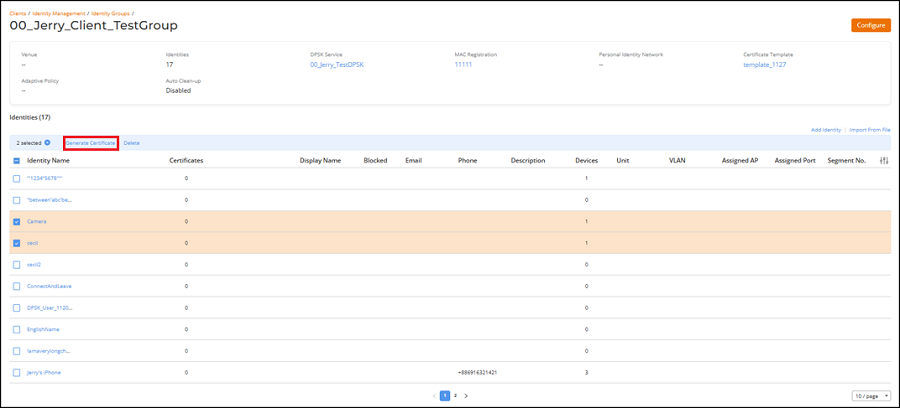
name.The Identity Group Details page is displayed with the configured information for the selected group and the list of identities.
- Select the checkbox for one or more identity names, and then click
Generate Certificate.
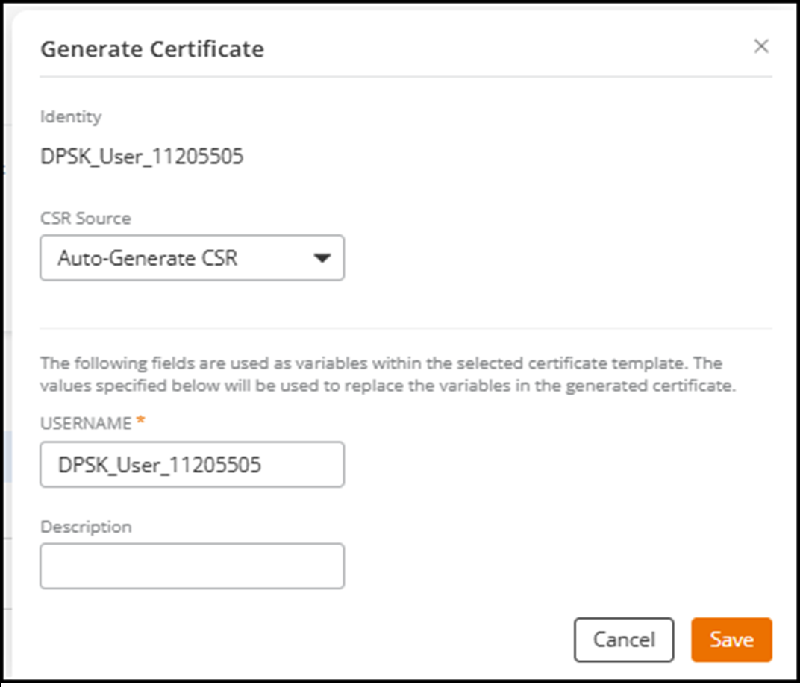
- Select the CSR Source from the drop-down list. The options are Auto-Generate CSR and Copy & Paste CSR.
- Copy and paste a valid CSR into the Certificate Signing Request field.
- Enter a Username. The
value you enter replaces this variable for all selected identities.Note: Identities containing invalid characters cannot be processed, and an error message is displayed. The allowed characters for identity names are a–z, A–Z, 0–9, period (.), hyphen (-), and underscore (_).
- (Optional) Enter a Description.
- Click Save.