Allowing Sign-In Using X (Twitter)
When creating a captive portal network
with self sign in, you can allow users to register with their X (formerly Twitter)
social
media account.
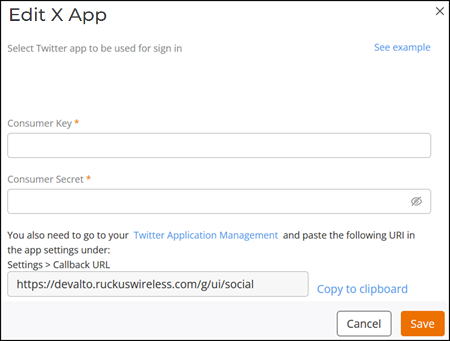
- The Edit X App window is displayed.
- In the Consumer Key and Consumer Secret fields, you must enter the valid user credentials, and then click Save.
- (Optional) Click See sample to view an example of the Self Sign In screen.
- When you have finished viewing the sample screens, click OK.
- Click Copy to clipboard to copy the displayed URL.
- Click X Application
Management. The X Application Management window is displayed.
- In X Application Management window, click , and paste the copied URL in the Callback URL field.
- Click Save.