Enabling Port MAC Security and Configuring Sticky MAC Globally
Sticky MAC allows dynamic learning of the
MAC addresses as devices connect to a switch port. You can enable sticky MAC globally
on
individual switch ports.
- From the navigation bar, select .
- Click on a switch name, then in the Overview page, click the Ports sub-tab.
- Select a specific port checkbox and click Edit. The Edit Port sidebar is displayed.
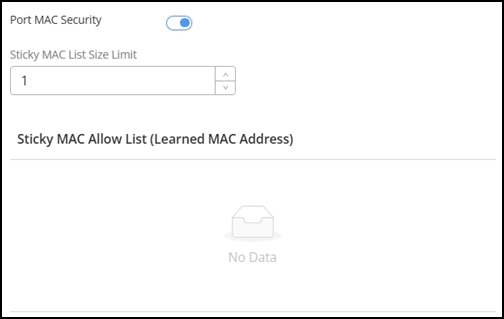
- Toggle Port MAC Security to enable allowing specific permitted source MAC addresses, ensuring that only packets from authorized devices are allowed and preventing unauthorized devices from accessing the network.
- For Sticky MAC List Size Limit, enter a number ranging from 1 (default) through 8256. The value specifies the number of learned MAC addresses to be added to the allow list.
- Click Apply to save the changes.The Sticky MAC Allow List (Learned MAC Address) table displays the list of learned MAC addresses.