Searching for Menu Options and Data
Examples:
-
Consider the navigation hierarchy. Searching on the term AP List will result in a successful finding of the menu option; searching on Wi-Fi or Access Points (non-clickable navigation path labels) will not result in a successful finding of the AP List menu option.
- Consider the navigation hierarchy. Searching on the term Activities will result in a successful finding of the menu option; searching on Administration or Timeline (non-clickable navigation path labels) will not result in a successful finding of the Activities menu option.
- Locate the
 icon in the upper-right corner of the application header.
- Hover over the icon to switch it to its active state, then click
the
 icon to expand the search field.
 - Type a keyword in the search
field. You must enter a minimum of two characters. Capitalization does not
matter.
A keyword may be the full or partial name of a selectable menu option (such as Configuration Profiles) or part of a configuration setting if looking for data (for example, a Venue street address, a device Model name, or a Tag name).
Partial strings return all matching results; for example, searching for 09010 returns a list of all your ICX switches running firmware versions TNR09010j_cd2, TNR09010h, and SPR09010j_cd3.
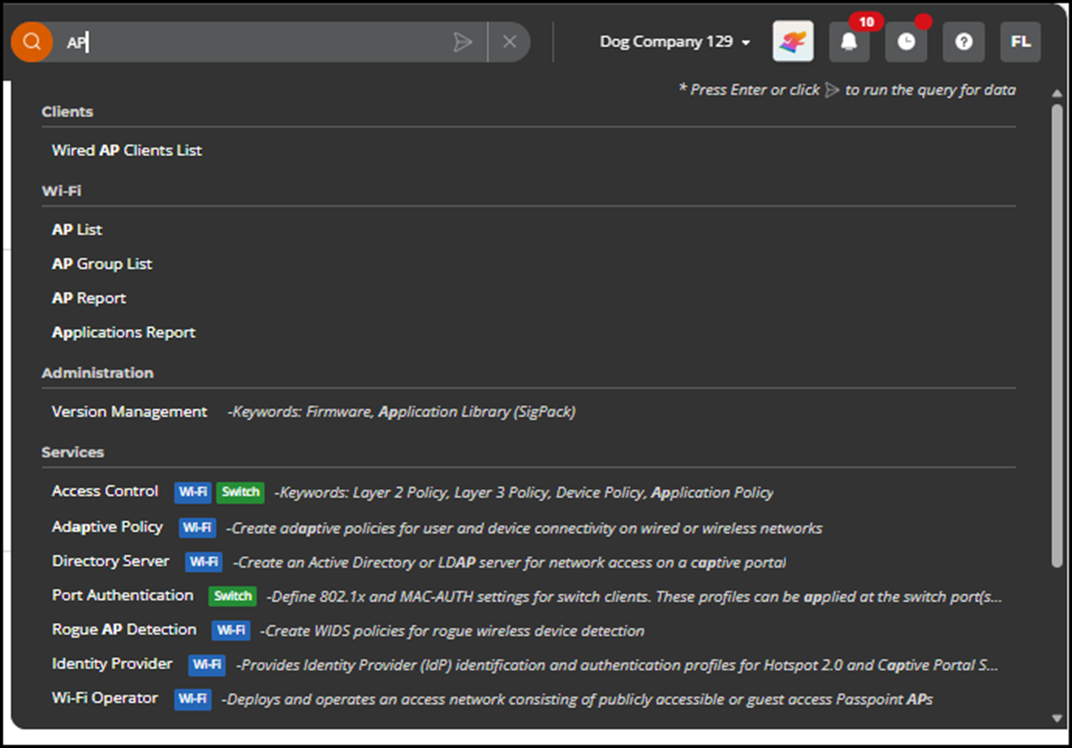
- Review the pop-up list of menu option suggestions grouped by category (Figure 1 shows an example displaying four category groupings: Clients, Wi-Fi, Administration, and Services). Select a result to open the corresponding page immediately.
- Press the
Enter key on your keyboard or click the
 icon to run the query for data entries as well as related navigation links and
view the full Search Results page.
icon to run the query for data entries as well as related navigation links and
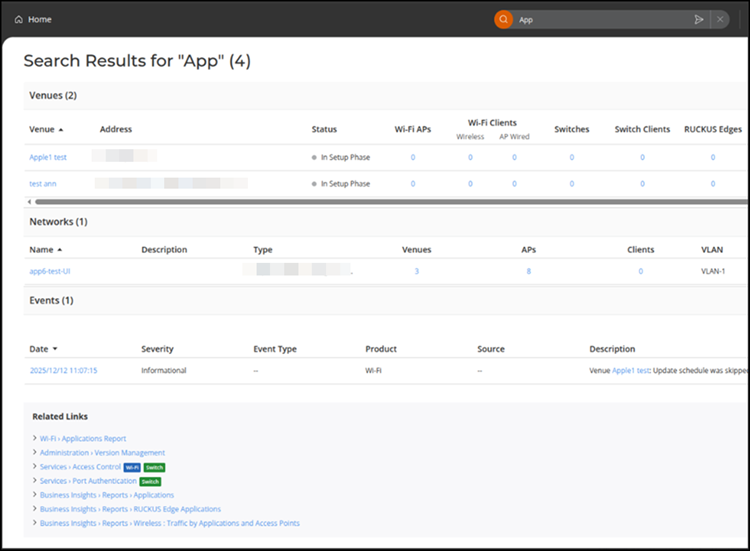
view the full Search Results page.If no data-related results are found, the page displays a message indicating this and suggests alternative search terms. A Related Links section may appear at the bottom of the Search Results page, regardless of whether data entries are found. These links either contain the search term itself or the link's page contains something that includes the search term.
If data-related results are found, matching items are listed from data tables such as Venues, Networks, APs, Switches, Clients, and Events, along with Related Links. These results appear grouped by category.
 Version 1 - Editorial Reviewed by Laurie