Upgrading RUCKUS Edge Firmware Version
- From the navigation bar, select
, then click the RUCKUS Edge
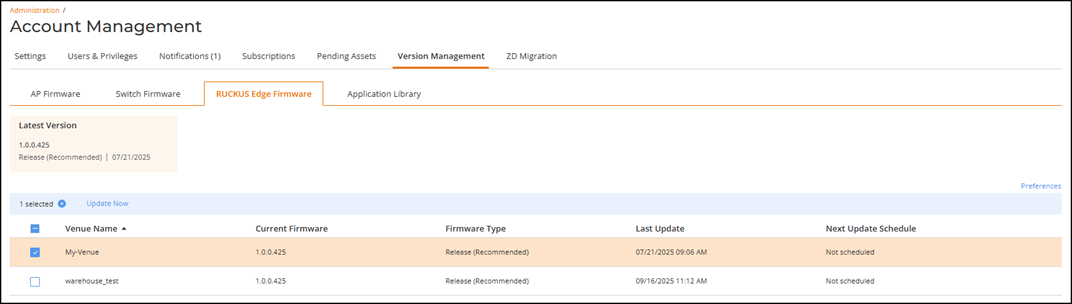
Firmware sub-tab.The RUCKUS Edge Firmware page is displayed with the following information:
- Latest Version: The latest firmware version recommended by RUCKUS One for active and legacy devices and the date on which the recommended release was made available.
- Venue Name: The name of the venue.
- Current Firmware: The firmware version currently running in that venue.
- Firmware Type: The RUCKUS Edge firmware: Release (Recommended) or Beta.
- Last Update: The date when the firmware was updated for the venue.
- Next Update Schedule: The date of the next scheduled firmware update.
An
 icon in the tab name provides a visual indicator when new updates are
available; pausing our cursor over the icon displays text stating the same.
icon in the tab name provides a visual indicator when new updates are
available; pausing our cursor over the icon displays text stating the same. - Select the venues that must be updated and click Update Now as shown in the following image.
- Choose the required version and click Run Update.A pop-up notification stating that the venue's firmware upgrade has been triggered will be displayed.
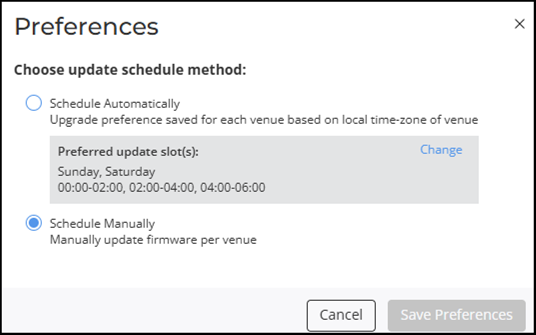
- (Optional) Configure your upgrade schedule preferences for RUCKUS Edge firmware management.