RUCKUS One AP Cloud Discovery
Adding an AP
- On the navigation bar, click .
- Click Add and select AP from the menu.
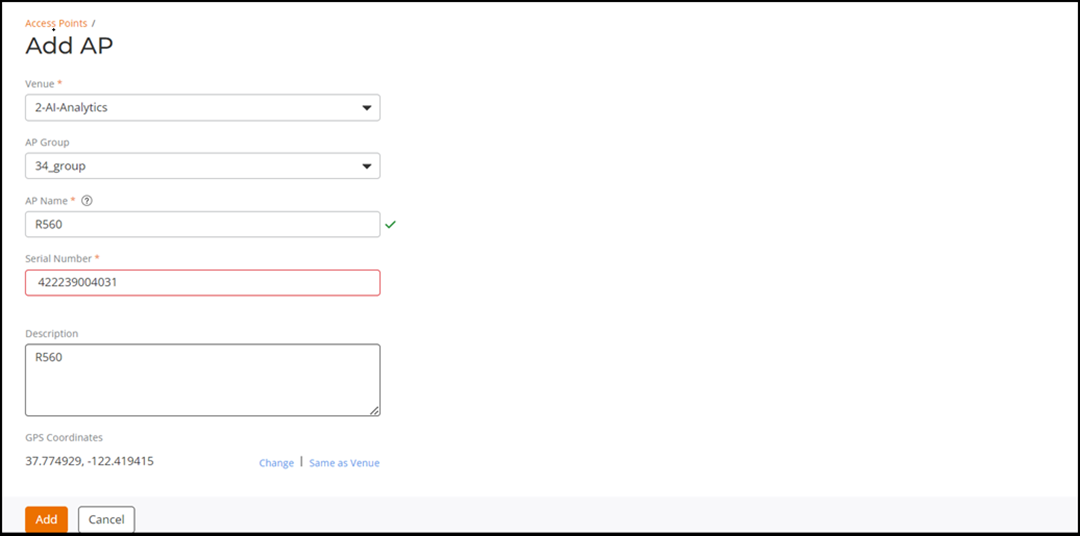
- Complete the following fields
to add an AP:
- Venue: Select the venue from the drop-down to which you want to deploy this AP.
- AP Group: Select an AP Group from the drop-down to which you want to add this AP.
- AP Name: Type a name for the AP. We recommend that you use the AP model number or another name that helps you identify this AP.
- Serial Number: Type the 12-digit serial number of the AP.
- Description: (Optional) Add a brief description of the AP.
- GPS coordinates: (Optional) Add GPS coordinates for the AP.
After the AP has been added, the information is made available in the Cloud controller and the AP registrar. The AP registrar is a software service in the Cloud that registers the AP with the Cloud controller for the first time. The AP registrar points the AP towards the proper Cloud controller address.