Adding a Switch
From the RUCKUS One web interface, you can
add supported ICX switches to your RUCKUS One account. Alternatively,
you can use the RUCKUS One Mobile App to scan the QR code on the ICX switches and add them to your RUCKUS One
account.
Note: The following ICX switch families are supported for
onboarding in RUCKUS One:
- ICX 8100 / ICX 8100‑X
Series: You can onboard ICX 8100 and ICX 8100-X switches to RUCKUS One by entering the switch serial number and assigning
it to a venue. Only the Router image firmware is supported, and breakout
ports and OSPF configuration are not available. Ensure that the switch
is running a supported firmware version (10010f_cd2 or later) before
onboarding.
ACX-93833 Support ICX8100-X - Stacking on R1
- ICX 8100‑AV Series: ICX 8100‑AV models can be added to RUCKUS One when running supported Router image firmware.
- ICX 8200‑AV Series: ICX
8200‑AV models can be added to RUCKUS One when
running supported Router image firmware.
ACX-108409- R1 support for Phase 1 AV Switches
- ICX 8200 Series (Non‑AV): The newly
supported ICX8200‑24XP2 and ICX8200‑48NP2 models (Rodan Phase 3) can be
added to RUCKUS One when
running supported Router image firmware (10.0.10j or later, or 10.0.20c
or later). Only the Router image is supported, and breakout ports are
not available.
ACX-116774 - Support ICX 8200 phase 3
- ICX 7K Series (7150 / 7550 / 7650 / 7850):
ICX 7K switches require firmware version 09.0.10k or later to onboard to
RUCKUS One. Switches running versions below 09.0.10 are
blocked.
ACX-112765 - ICX 7k series switches
Refer to Supported ICX 8100 and ICX 8200 Series Switch Models for more details.
- On the navigation bar, select
. The Switch List page is displayed.
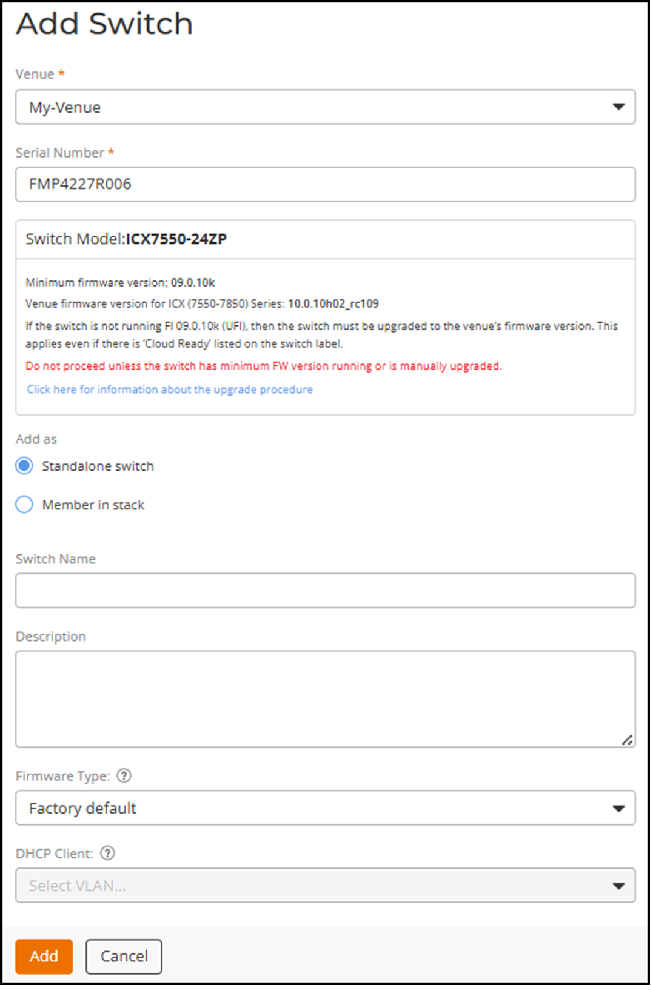
- Click Add in the upper-right corner of the Switch
List page and select Switch from the
drop-down list.The Add Switch page is displayed.
- Select the Venue to which you want to add the switch.
- Enter the 11‑digit Serial Number of the switch.
- Select one of the following in the Add as field:
- (Optional) Enter a Switch Name.
- (Optional) Enter a Description.
- (Optional) Select a Firmware Type
from the drop-down list to upload to the switch. The options are Switch,
Router, and Factory
default.
- Note:
- The selected firmware type is applied only if the switch is in factory‑default state.
- Switches with existing configurations are not updated by this setting. This prevents disconnections.
- ICX 8100 / ICX 8100‑X / ICX 8100‑AV / ICX
8200‑AV / ICX 8200 (non‑AV) always require the Router image for RUCKUS One management.
8200 is newly added - ACX-108409- R1 support for Phase 1 AV Switches.ICX 8200 (non‑AV) - ACX-116774 - Support ICX 8200 phase 3
- (Optional) Select a VLAN from the DHCP Client drop-down list.
- Click Add.
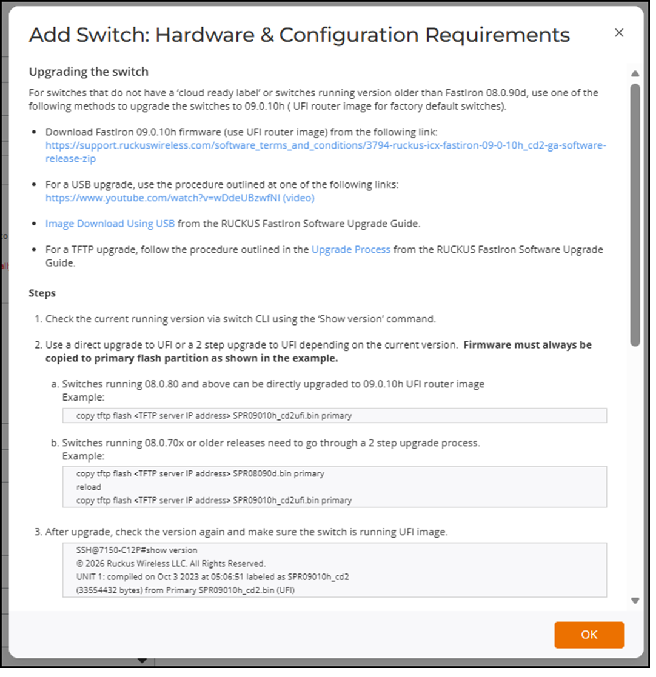
Note: ICX 7K switches with firmware lower than 09.0.10 will remain
in Never contacted
cloud, because RUCKUS One blocks them from
onboarding.
ACX-112765 - ICX 7k series
switches