Recovering an Error-Disabled Port Automatically
RUCKUS One enables a port to recover
automatically from an error-disabled state by providing error disable recovery options
at
the switch level. Configuring this option eliminates the need for manual intervention
each
time a port becomes error-disabled.
- From the navigation bar, select .
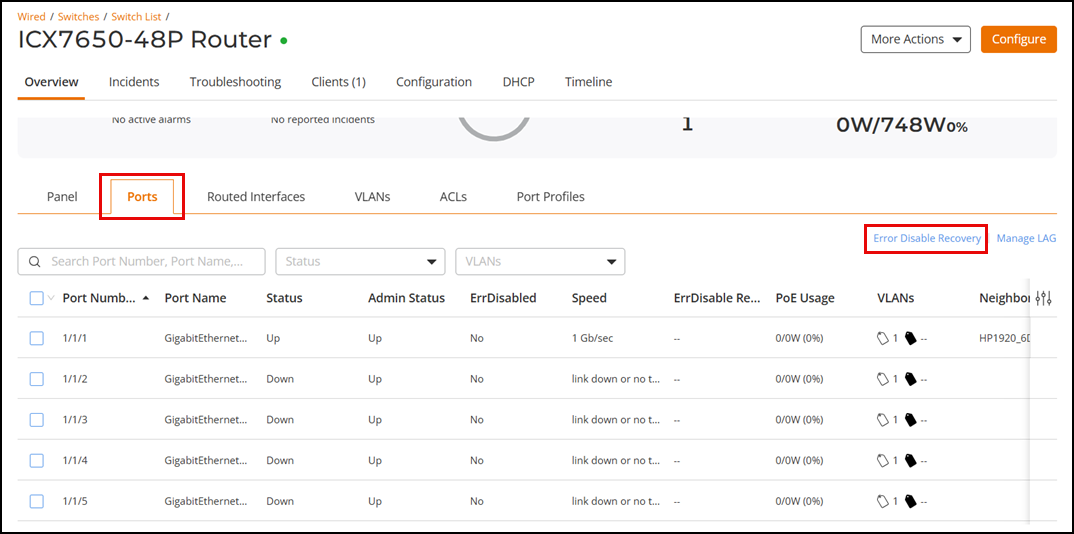
- Click on a specific switch name. By default, the Overview tab and the Panel sub-tab are displayed.
- Select the Ports sub-tab.
- Click Error Disable Recovery to configure automatic recovery options for one or more error conditions.
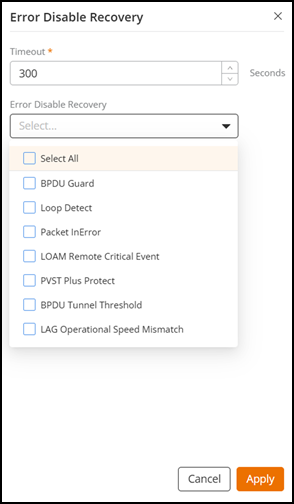
- For Timeout, configure the timeout interval for ports in the error-disabled state, after which the ports are re-enabled automatically. Valid values are from 10 through 65535 seconds; the default value is 300 seconds.
- For Error Disable
Recovery, select one or more error disable recovery options from
the drop-down list.
- Select All: Enables auto-recovery from all causes.
- BPDU Guard: Enables auto-recovery from a Bridge Protocol Data Unit (BPDU) Guard error condition, which protects against BPDU attacks by disabling the port if a BPDU is received.
- Loop Detect: Enables auto-recovery from a loop detection error condition, which prevents network loops by disabling the port if a loop is detected.
- Packet InError: Enables auto-recovery from a packet inError error condition, which disables the port if it receives packets with errors.
- LOAM Remote Critical Event: Enables auto-recovery from a Link OAM (LOAM) Remote Critical Event error condition, which is a critical error (such as a switch fan failure or a switch over-temperature condition) affecting the Ethernet in the First Mile (EFM)-OAM interface, as detected by the remote peer device.
- PVST Plus Protect: Enables auto-recovery from a Per-VLAN Spanning Tree (PVST) Plus Protect error condition, which protects against misconfigurations in PVST.
- BPDU Tunnel Threshold: Enables auto-recovery from a BPDU Tunnel Threshold error condition, which protects against excessive BPDU tunneling.
- LAG Operational Speed Mismatch: Enables auto-recovery from a Link Aggregation Group (LAG) Operational Speed Mismatch error condition, which occurs when there is a speed mismatch in the aggregated links.
- Click Apply.