Configuring an SMS Provider for the Account
RUCKUS One allows integrating a
customer-owned private SMS provider, like Twilio, Esendex, or Others, for Captive
Portal OTP
and system-wide usage for users. Each tenant account is provided with an initial pool
of 100
free SMS messages, and you can view the current SMS usage and remaining pool for your
guest
networks from the RUCKUS One web interface.
The user must have their Twilio Account SID and authorization token number, or their Esendex API Key, prior to beginning this task.
- On the RUCKUS One web interface, select .
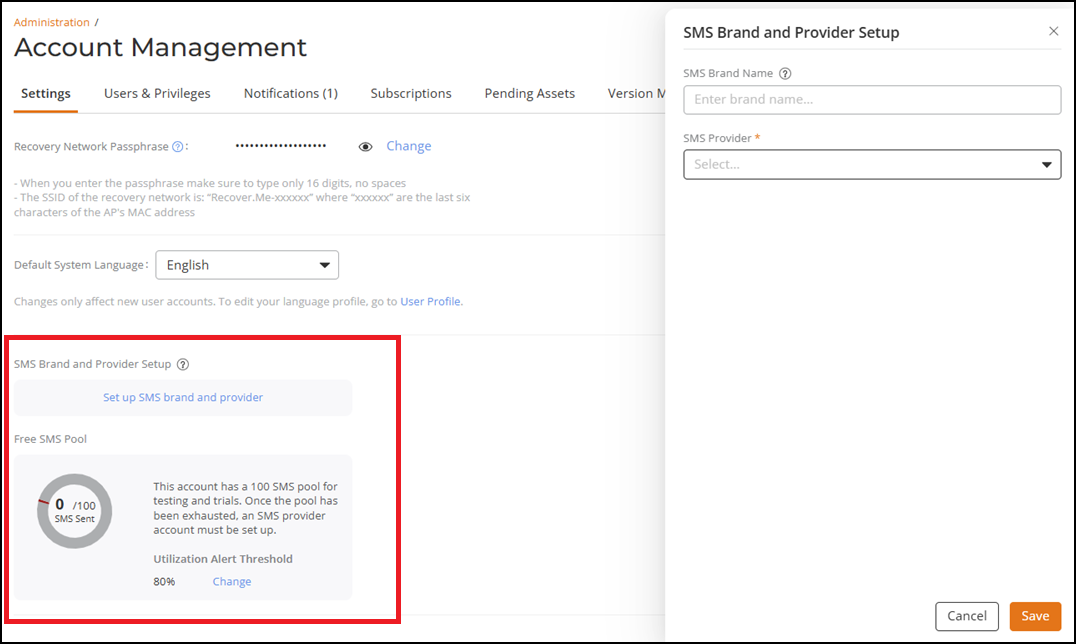
- In the SMS Brand and Provider Setup section, click Set up SMS brand and provider.
- (Optional) Enter an SMS brand name (maximum 64 characters).
- Select the provider from the
drop-down list. Options include Twilio,
Esendex, and Other.Follow these steps to configure Twilio as the SMS provider:
- Type the string identifier in Account SID.
- Type the authorization token number in Auth Token.
- Select a medium through which messages must be sent. Options include:Select a messaging service or phone number from the drop-down list.
- Click the Enabled WhatsApp checkbox to enable WhatsApp functionalities for the Captive Portal Self Sign-In network. Verify that your chosen messaging service or phone number is set up to support WhatsApp via Twilio.
- The WhatsApp Authentication Template SID is available in your Twilio Content Template Builder, and must be copied from the Twilio console.
- Click Save.The SMS Provider information is displayed. You can click Change to modify the provider details or click Remove to remove the SMS Provider.
By default, each tenant account is provided with 100 complimentary self sign-in SMS messages.
Note: A grace period is granted on the RUCKUS One platform, permitting users to configure their own Twilio and Esendex services. This grace period is a one-time courtesy extended to existing customers who have been using 80 or more SMS messages per month, over the past three months.remove above sentence?If the free pool threshold is surpassed, the system deactivates the default guest WLAN SMS function after the grace period.
Remove?The system will also make the SMS function for self-sign-in on the Captive Portal inactive if the SMS pool of 100 is depleted and a private SMS account is not set up. - In the Free SMS Pool section,
you can view the number of SMS messages sent and modify the Utilization Threshold
Alert value used by the system to trigger a notification alarm when the
value is reached. By default, the utilization percentage is set to 80%. You can
set it from 50% to 100%, then click Save to apply your
change.Note: Only self sign-in SMS messages are counted towards the free SMS pool. Host approval SMS messages use the SMS Provider account and do not count towards the free SMS pool utilization.