Configuring a ServiceNow Scripted REST API Endpoint for Webhook Integration
The Webhooks service forwards
real‑time incident, activity, and event notifications from RUCKUS One to external systems. A ServiceNow Scripted REST API endpoint receives the
webhook payload and can create or update incidents based on the received data.
- Note:
- Each RUCKUS One tenant can create up to 20 webhook configurations. The Name and Webhook URL must be unique per tenant. At least one category (Incidents, Activities, or Events) must be selected before you can enable a webhook.
- For ServiceNow, the shared secret is included inside the payload for compatibility with existing customer scripts. Other payload types may send the secret in the Authorization header. Ensure your ServiceNow script checks the correct location for the secret.
- Log in to the ServiceNow instance.
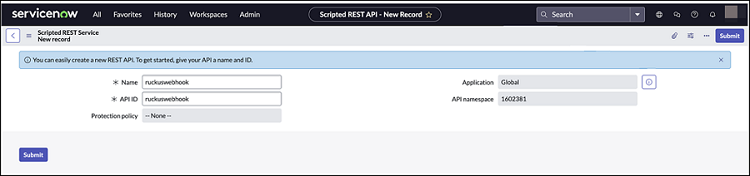
- Select and click New.
- Click Submit.The Scripted REST Service is created.
- Open the Scripted REST Service, click New in the Resources tab.
- Set HTTP
method to POST, set
Relative path to
/notification, and paste the following script.Note: Ensure that the spacing is retained when you copy and paste the code.
(function process(/*RESTAPIRequest*/ request, /*RESTAPIResponse*/ response) { // Secret shared between Ruckus One and ServiceNow // to ensure the authenticity of data received. var secret = "12345678"; var data = request.body.data; // Ensure request uses correct shared secret key if (data.secret == secret) { var mode; // insert or update var inc = new GlideRecord('incident'); // Check if incident exists inc.addQuery('number', data.payload.id); inc.query(); if (inc.hasNext()) { inc.next(); mode = "update"; } else { inc.initialize(); mode = "insert"; } // Add/update fields inc.number = data.payload.id; inc.state = 1; /* New */ inc.impact = 2; /* Medium */ inc.urgency = 2; /* Medium */ inc.short_description = data.name + " " + data.type; inc.description = getDescription(data); // Insert/Update the incident inc[mode](); var status = mode + (mode == 'insert' ? 'ed' : 'd'); gs.info('incident ' + data.payload.id); } else { gs.warn("Invalid secret to run Ruckus One webhook"); } // Respond to the Webhook response.setStatus(200); /** * Generate description for incident */ function getDescription (data) { return [ 'id : ' + data.id, 'name : ' + data.name, 'type : ' + data.type, 'tenantId : ' + data.tenantId, '', 'Details:', '------------------------------------------------', 'id: ' + data.payload.id ].join('\n'); } })(request, response); - (Optional) In the
Security tab, uncheck Requires
Authentication if you rely only on the shared secret.The Webhook URL will comprise <ServiceNow instance host> / <BASE API Path> / <Relative Path>. For example: https://dev187130.service-now.com/api/1602381/ruckuswebhook/notification.
- Click Submit.