Viewing and Syncing Configuration Template Drifts
You can view configuration differences
between applied configurations and their templates and synchronize them to maintain
consistency.
This feature helps ensure that all configurations remain aligned with the defined
template
settings.
Complete the following steps to view and synchronize configuration template drifts:
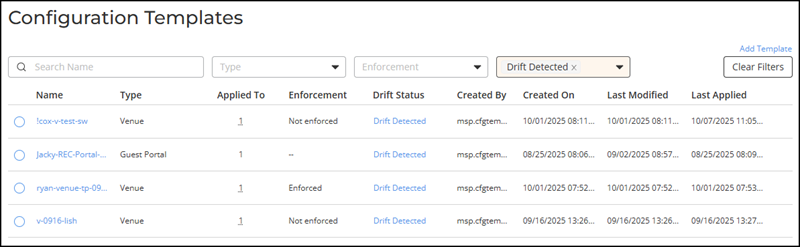
- In the navigation bar, select
.The Configuration Templates page is displayed.
- Select the configuration template having
the Drift Detected status by clicking the radio button next to the
Name field.
If you have a long list of templates, you can use the Drift Status filter to quickly view only templates having the Drift Detected status.
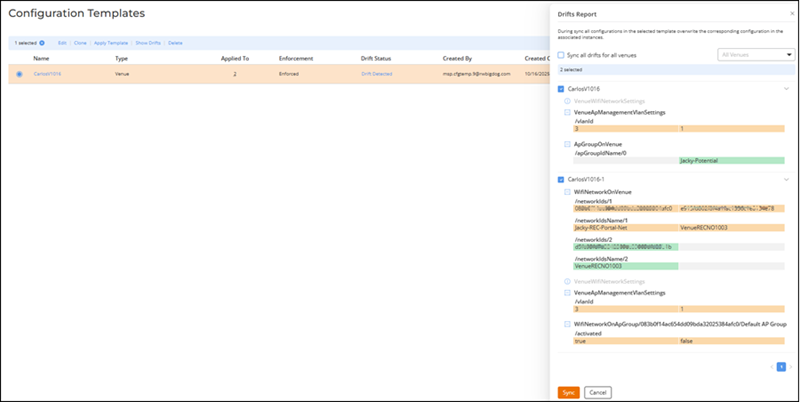
- Click Show Drifts to view differences
between the applied configuration and the template.The Drifts Report sidebar is displayed.
The Drifts Report lists either the associated venues or configuration details, depending on the template type.
- For Venue-based templates: The
Drifts
Report displays a list of all venues where the template is applied.
To synchronize:
- Select the Sync all drifts for all venues checkbox.
- Choose the desired venue from the drop-down menu.
- Click Sync to apply
changes.
ACX-101603 - Config Template 5 - Append Mgmt VLAN in Venue template Zam Huang (SME) - The change was originally for MSP. But I will be applicable for R1 soon. Synchronizing drifts overwrites existing configurations in the associated venues or devices. Review the configuration differences carefully in the Drifts Report before applying changes. If the venue template includes AP Management VLAN settings, the VLAN configuration will also be updated when you sync the drift.
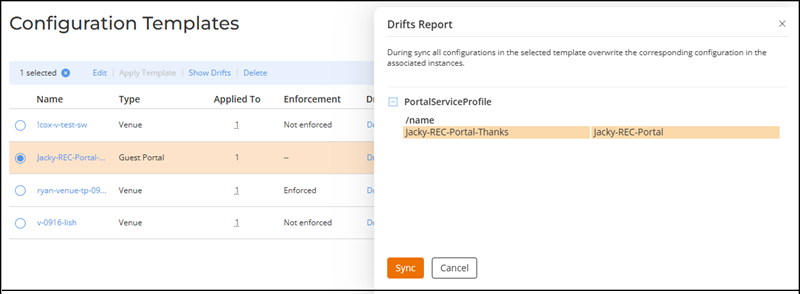
- For non-Venue templates: The
Drifts Report sidebar lists all configuration parameters that
differ from the template. Review the differences and click Sync to realign the
applied configuration with the current template version.
- For Venue-based templates: The
Drifts
Report displays a list of all venues where the template is applied.
- The system updates the applied configuration using the current version of the template.