MAC Registration Lists Details
The MAC Registration List allows a network
to create a list of devcies that are allowed to connect to a WLAN based on Layer 2
MAC
address. After creating the MAC list, enable the MAC authentication using Creating an Open Network (Wi-Fi Open network) or
Creating a Network That Uses a Passphrase
(PSK/SAE) (Wi-Fi Network
Pre-Shared Key).
Complete the following steps to view the MAC Registration Lists details:
- From the navigation bar, select
.The My Services page is displayed.
- In the My
Services page, click MAC Registration Lists
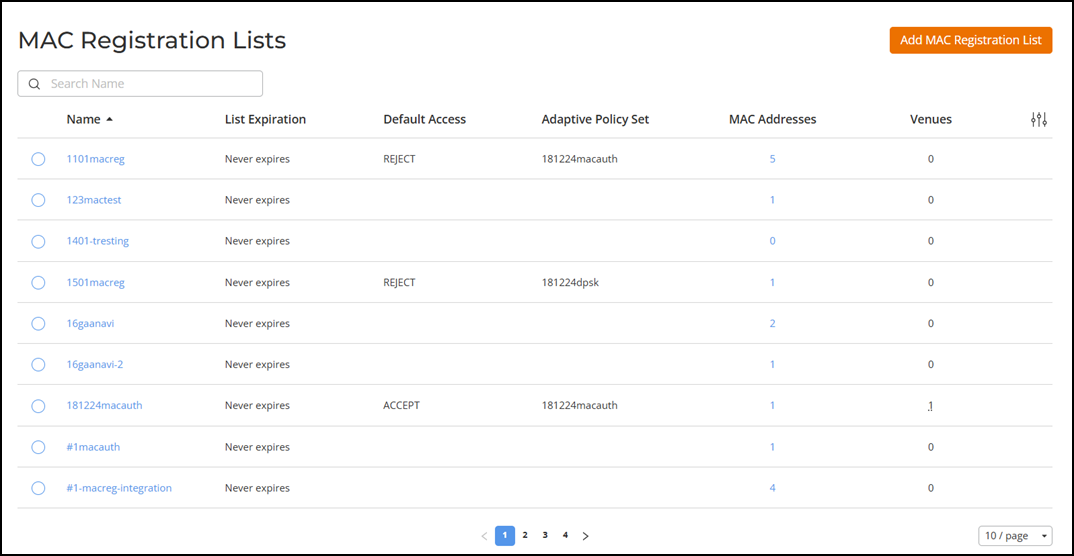
tile.The MAC Registration Lists page is displayed.
The MAC Registration Lists are displayed in the table with the following information.
- Name: Displays the MCA registration list name.
- List Expiration: Displays the expiration date of the MAC registration list.
- Default Access: Displays the type of default access.
- Access Policy Set: Displays the access policy set name associated with the MAC registration list.
- MAC Address: Displays the total MAC address counts associated with the MAC registration list.
- Venues: Displays the total venue counts associated with the MAC registraion list.
- In the Name
column, click <MAC
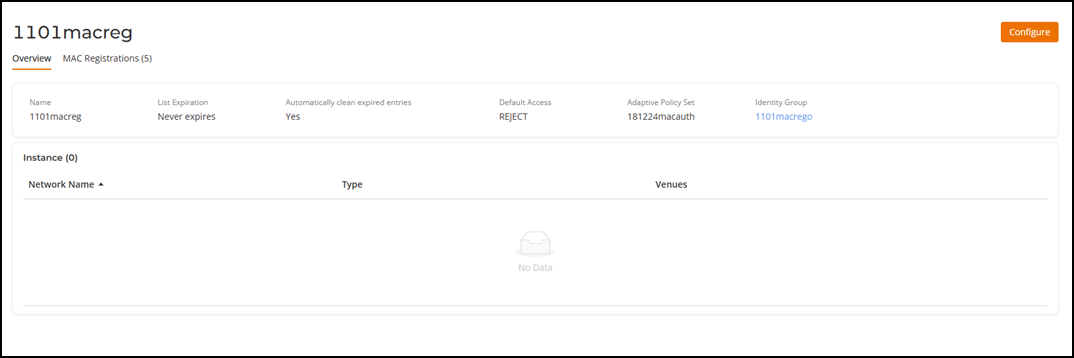
Registration List name>.The <MAC Registration List name> details page is displayed. You can see the following tabs.
- Overview: This tab displays the MAC Registration Name, Expiration duration, Automatically clean expired entries enabled or disabled, Default Access, Access Policy Set, and Instance.
- MAC Registrations: This tab displays the MAC Address, Status, Username, E-mail, Registration Date, and Expiration Date.