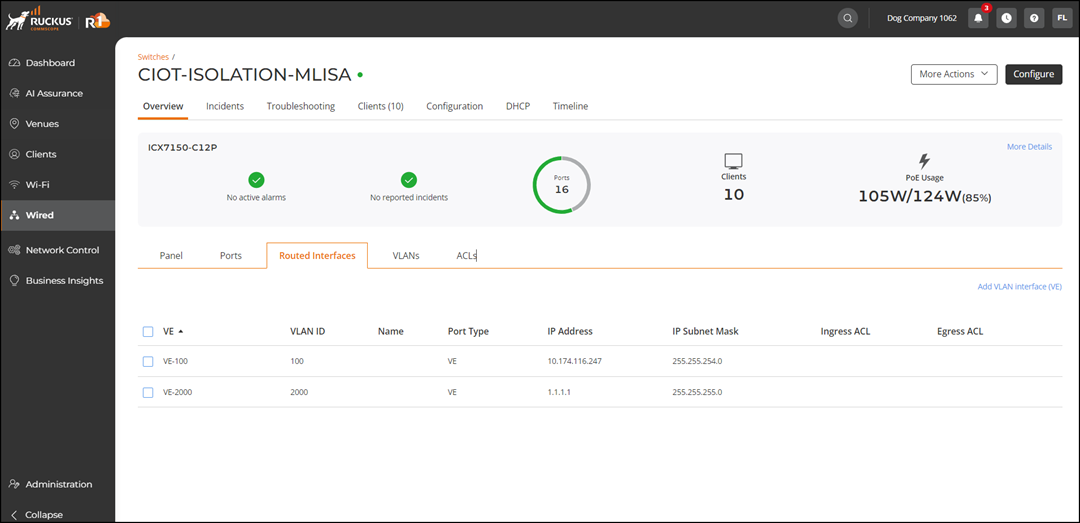
Viewing Routed Interfaces
Routed interfaces are utilized to link different networks, such as connecting a router to a switch or bridging two routers. They can also be employed in multilayer switches to facilitate routing between Virtual Local Area Networks (VLANs). These interfaces offer enhanced control over traffic management and can support sophisticated routing protocols like Open Shortest Path First (OSPF), Border Gateway Protocol (BGP), and Enhanced Interior Gateway Routing Protocol (EIGRP).
The ICX 8100, ICX 8100‑X, and ICX 8100 AV models are supported. The following limitations apply:
- Routed interfaces (VEs) are supported on firmware 10.0.10h and later.
- Only the default VE interface is supported on firmware versions earlier than 10.0.10h.
- In firmware 10.0.10h and later (excluding the 10.0.20 series), up to 512 VE interfaces are supported.
- On the navigation bar, select
. The Switches page is displayed, defaulting to the Switch List tab.
- Click the name of the switch to
view its routed interface configuration.The switch detail page is displayed, defaulting to the Overview tab.
- Select the Routed Interfaces
sub-tab to view the routed interfaces. The page displays the following information:
- VE: Displays the VE interface identifier (for example, VE‑100).
- VLAN ID: Displays the VLAN associated with the VE interface.
- Name: Displays the configured name of the interface.
- Port Type: Displays VE, indicating a virtual routed interface.
- IP Address: Displays the IP address assigned to the interface.
- IP Subnet Mask: Displays the subnet mask associated with the IP address.
- Ingress ACL: Displays the ACL applied to incoming traffic.
- Egress ACL: Displays the ACL applied to outgoing traffic.
- (Optional) Click Add VLAN Interface (VE) to to create a Virtual Local Area Network (VLAN) interface for the switch. Refer to Adding VLAN Interfaces (VEs) .
- (Optional) Select the checkbox alongside the name of the VE to display the following options: