Reports
On the navigation bar, select . The Reports page is displayed.
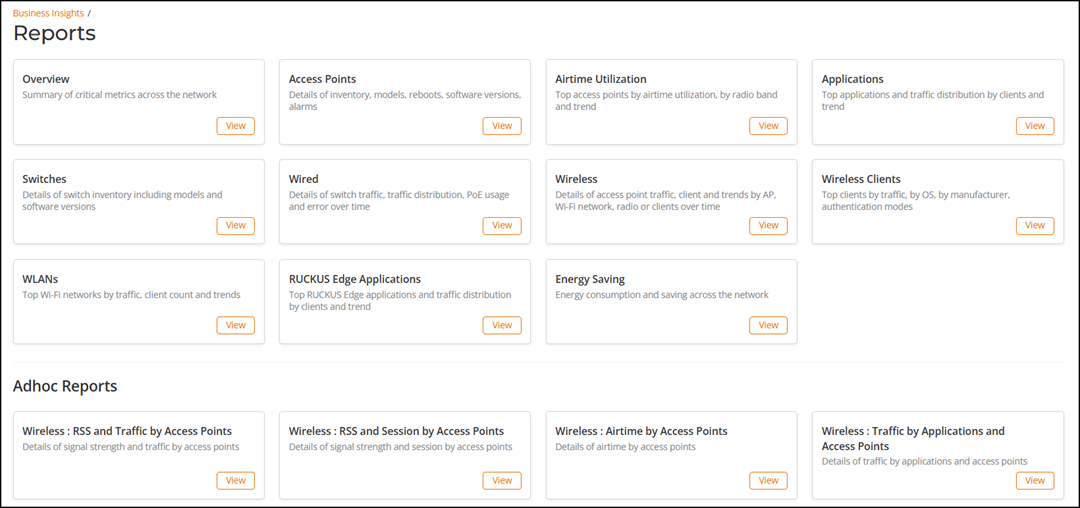
The Reports page has the following tiles:
- Overview: Provides an overview of the complete network. For more information, refer to Reports Overview Dashboard.
- Access Points: Provides a report of all the APs connected to the network. For more information, refer to Access Points Report.
- Airtime Utilization: Provides an airtime utilization report of all the APs connected to the network. For more information, refer to Airtime Utilization Report.
- Application: Provides the details of the applications accessed by the user connected to the network. For more information, refer to Applications Report.
- Switches: Provides a report of all the switches connected to the network. For more information, refer to Switches Report.
- Wired: Provides a report of the wireless traffic connected to the network. For more information, refer to Wired Report.
- Wireless: Provides a report of the wireless traffic connected to the network. For more information, refer to Wireless Report.
- Wireless Clients: Provides a report of traffic and trends over time from the client perspective. For more information, refer to Wireless Clients Report.
- WLANs: Provides a report of SSIDs. For more information, refer to WLAN Report .
- RUCKUS Edge Applications: Provides statistics-based application reports accessed by network clients. For more information, refer to RUCKUS Edge Applications Report.
- Energy Saving: Provides a tenant-level report of energy-saving data across all venues. This option will be greyed out when Energy Saving is not enabled through Intent Settings and the tenant account does not have a Professional tier license. For more information, refer to Energy Saving Report
- Adhoc Reports: Provides
predefined, table-based views of network data, designed primarily to meet customer
needs for structured exports in CSV format. These reports focus on delivering
raw,
tabular data suitable for offline analysis, reporting, and integration with external
tools. The following reports are available under Adhoc Reports:
- Wireless: RSS and Traffic by Access Points: Provides a report of received signal strength (RSS) and traffic volume by access point. For more information, refer to Wireless: RSS and Traffic by Access Points.
- Wireless: RSS and Session by Access Points: Provides a report of received signal strength (RSS) and client session count by access point. For more information, refer to Wireless: RSS and Session by Access Points.
- Wireless: Airtime by Access Points: Provides a report of airtime utilization metrics by access point. For more information, refer to Wireless: Airtime by Access Points.
- Wireless: Traffic by Applications and Access Points: Provides a report of traffic data segmented by application and access point. For more information, refer to Wireless: Traffic by Applications and Access Points.