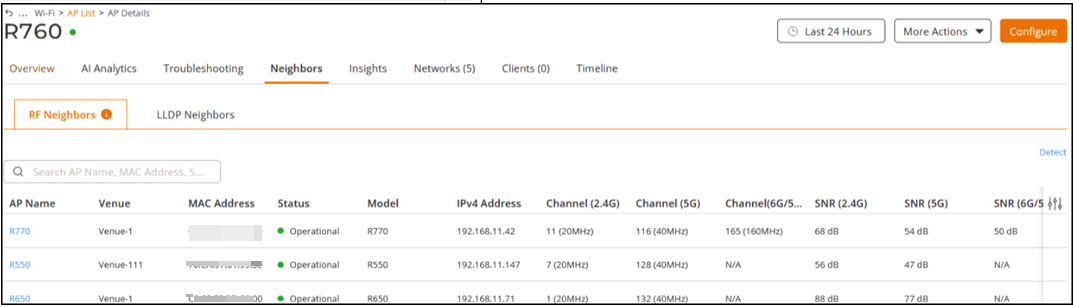
Viewing RF Neighbors
You can view the RF neighbors of an
AP.
- On the navigation bar, click .The Wi-Fi page is displayed.
- From the AP list, click name of the AP.
- Select the Neighbors tab.
- Select RF Neighbors tab.The RF Neighbors page is displayed.
- AP Name: Displays the
AP name.ACX-114468The AP name is clickable. Selecting it opens the AP details page. Only neighboring APs that the user has permission to view are displayed.
- MAC Address: Displays the MAC address of the AP.
- Status: Displays the status. of the AP.
- Model: Displays the device model.
- Venue: Displays the name of the venue.
- IP Address: Displays the IP address.
- Channel (2.4G) : Displays the channel (2.4G) information.
- Channel (5G): Displays the channel (5G) information.
- Channel (6G/5G): Displays the channel (6G/5G) information.
- SNR (2.4G): Displays the Signal strengths (2.4G) information.
- SNR (5G): Displays the Signal strengths (5G) information.
- SNR (6G/5G): Displays the Signal strengths (6G/5G) information.
- AP Name: Displays the
AP name.
- Click Detect to update the RF Neighbors information.