Customizing AP Mesh Settings
You can configure the Mesh settings on an
access point (AP).
- On the navigation bar, click .The AP List page is displayed.
- Click the name of the AP for
which you want to customize the AP Mesh settings, then on the
Overview page, click Configure.
Alternatively, click the checkbox for the specific AP name, then click
Edit.The AP configuration page is displayed, defaulting to the General tab view.
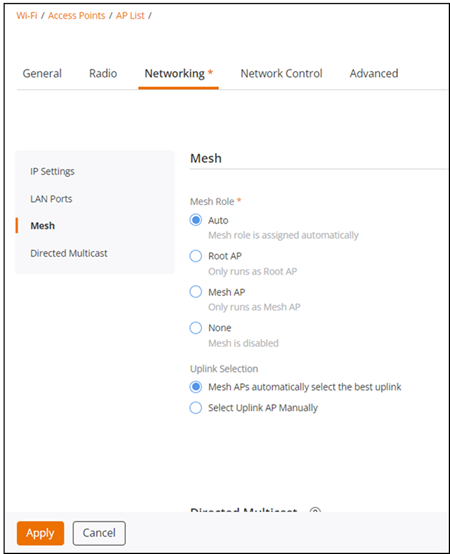
- Select the Networking tab.By default, the IP Settings section is displayed.
- From the left mini navigation bar, click the Mesh sub-tab.
- Select the Mesh Role (Auto, Root AP, Mesh AP, and None). By default, Mesh Role is set to Auto. Select None if you do not want this AP to be part of your Mesh network.
- (Optional) The Uplink Selection option is available only when the Mesh role is set to Auto or Mesh AP. By default, the Mesh APs automatically select the best uplink option is selected. You can choose the Select Uplink AP Manually option and select the uplink APs by clicking the checkboxes next to the AP names. Alternatively, you can search for a specific AP by entering its name in the search box.
- Click Apply.