Inviting a RUCKUS Partner to Manage Your Account
In addition to the local administrators,
your RUCKUS One
account can be managed by an authorized RUCKUS partner, also known as a value-added
reseller
(VAR). If you want third-party administrators to manage your RUCKUS
One account on your behalf, you can delegate up to 10 VARs.
- Note:
- The email ID must be already registered with
RUCKUS OneNote: You can use a single email address with multiple tenants associated with different brands or MSPs, enabling an MSP Admin to manage them all.ACX-74112
- The email must be unique for each invitation
- A VAR cannot invite another VAR
- A Managed Service Provider (MSP) End Customer, an MSP Integrator, and an MSP Installer cannot invite a third-party administrator
- Each tenant can invite up to 10 third-party administrators
- From the navigation bar, select
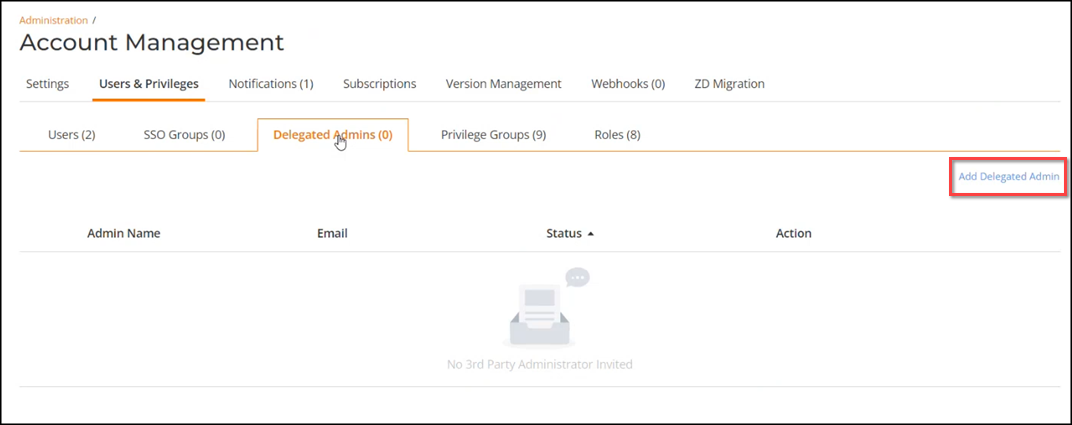
. The Users & Privileges page provides access to lists of local administrators, third-party administrators (RUCKUS Partners), SSO groups, and privilege groups with associated roles that you have authorized to manage your account.
- Select the Delegated
Admins sub-tab. The following information is displayed:
- Admin Name: Displays the name of the delegated administrator.
- Email: Displays the email address of the delegated administrator.
- Status: Indicates the current status of the delegated administrator (Invitation sent, Access granted).
- Action: Represents the possible actions that an Administrator or Prime Admin can take on a delegated administrator account (Revoke, Cancel).
- Click Add Delegated Admin.
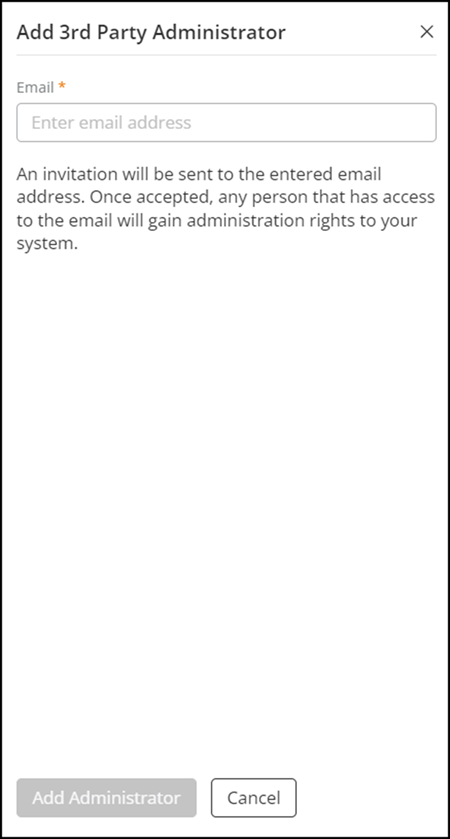
- In the Add 3rd Party Administrator sidebar, enter the email ID of the administrator and click Add Administrator.
- (Optional) Under the Action column, click Revoke access to revoke access granted to a third-party administrator.
- (Optional) Under the Action column, click Cancel Invitation to cancel the invitation sent to a third-party administrator.