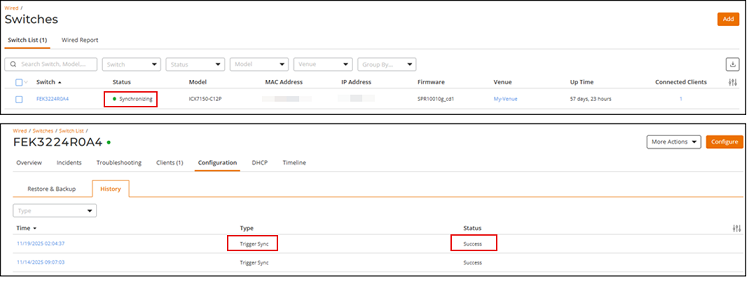
Syncing Switch Data
You can manually synchronize a switch to
pull the latest configuration and operational status into RUCKUS One.
- On the navigation bar, select
.The Switches page is displayed, defaulting to the Switch List tab.
- Click the switch name in the list.The details page for the selected switch is displayed, defaulting to the Overview tab.
- In the upper-right corner, click
More Actions and
select Sync
Data.Note: During synchronization, the Sync Data option becomes temporarily inactive; the switch status changes to Synchronizing, and a new entry is added to the History sub-tab in the Configuration tab.
In the Type column, the entry appears as Trigger Sync, and the Status column shows In Progress during the synchronization and updates to Success once it completes. Refer to Configuration History for additional information about the History sub-tab.