Creating a Wi-Fi Operator Profile
A Wi-Fi operator is the owner of a set of
Hotspot 2.0 enabled APs. Use a Wi-Fi Operator profile, which defines all the properties
pertaining to an operator, to connect Wi-Fi-capable devices to a Hotspot 2.0 Access
network.
Complete the following steps to create a Wi-Fi Operator profile:
- From the navigation bar, select
. Alternatively, You can click on . The Service Catalog page is displayed.
- Find the Wi-Fi Operator tile and click Add.
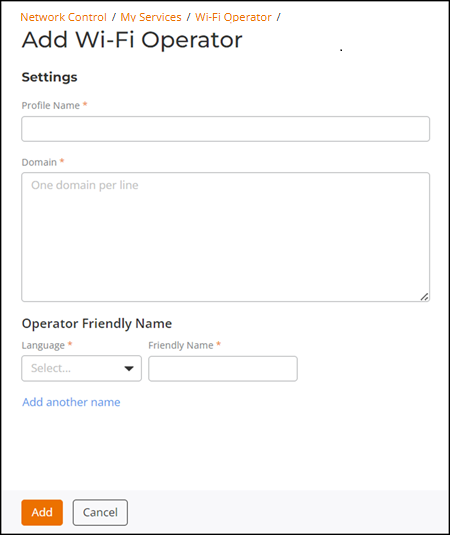
- In the Add Wi-Fi Operator page, enter the profile name.
- For Domain, enter a
fully qualified domain name (FQDN) (for example, mydomain.com).The Hotspot 2.0 AP broadcasts the domain name to indicate the home Wi-Fi providers. You can enter up to five domain names.
- For Operator Friendly Name, select the language and enter the Wi-Fi operator name. You can add the Wi-Fi operator names in multiple languages by clicking Add another name.
- Click Add.You can see the Wi-Fi operator profile in the Wi-Fi Operator table. Up to 16 Wi-Fi operator profiles can be created.