User Profile
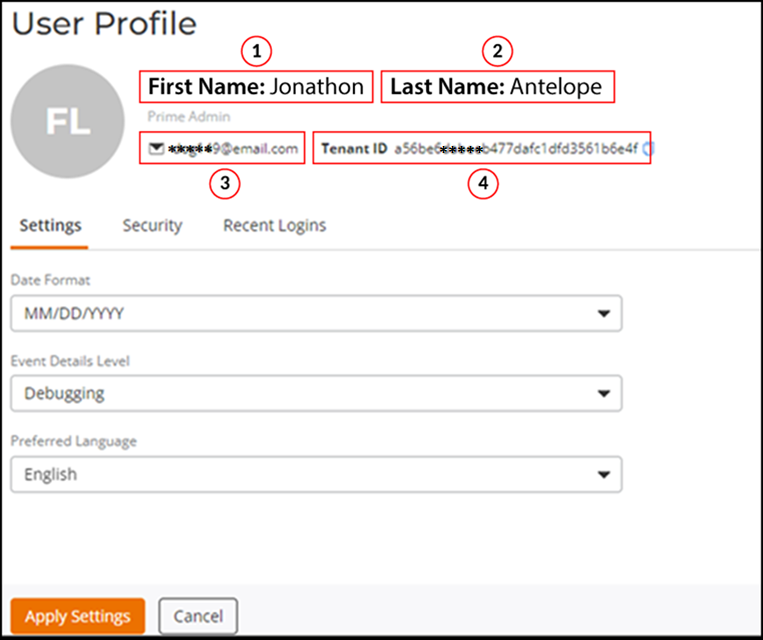
The User Profile page
displays information about the current user. You can view the first name, last name,
user
role, email address of the user, and the tenant ID. You can configure the date format,
event
details level, and preferred language on the User Profile
page.
- On the upper right corner, click the Account (FL) icon.
- Select User Profile from
the drop-down.The User Profile page is displayed.
- On the User
Profile page, select the Settings tab and
complete the following:
- Date Format: Select a desired date format. The supported options are DD/MM/YYYY, MM/DD/YYYY, and YYYY/MM/DD.
- Event Details
Level: Select the level of detail that you want RUCKUS One to
display for events in the Events page, which can be
accessed from the navigation bar, .
Note: RUCKUS One offers different levels of details for event types, such as 1, 2, 3, and 4. The level of detail you can view depends on your user role.The available options are:
- Preferred Language: Select your preferred language from the drop-down. By default, the system language is set to English.
- After selecting a date format, event details level, and the preferred language, click Apply Settings.
- (Optional) To display the Multi-Factor Authentication (MFA) feature status, select the Security tab. Refer to Enabling Multi-Factor Authentication and Viewing Audit Events for more information on MFA.
- (Optional) Select the Recent Logins tab to display the recent logins of the current user.