Configuring Global Notifications
- From the navigation bar, select .
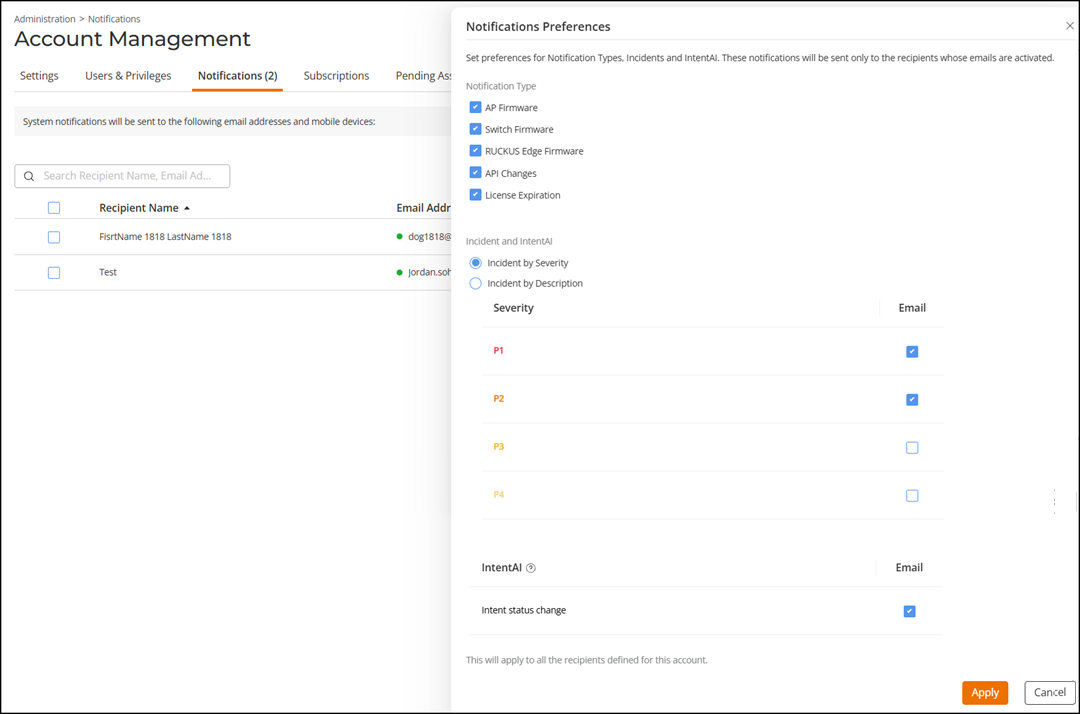
- Click Notifications Preferences on the upper-right corner of the page.
- Notification Type: Select one or more notification types. Options include AP Firmware, Switch Firmware, RUCKUS Edge Firmware, API Changes, and License Expiration.
-
Incidents:
Select one of the following options and configure the notification preferences:
Note: Users assigned the Prime Admin role or Role‑Based Access Control (RBAC) users granted Edit permission for Account Setup can configure notification settings for each Incident type.Note: ACX-116501
System administrators are granted access to most permissions; however, they do not possess the Account Setup privilege. As notification preferences are managed under Account Setup, system administrator accounts are restricted from viewing or modifying incident notification preferences.
- Incident by Severity: Select this option to receive email notifications based on incident severity level. Select one or more severity levels (P1–P4) to receive email notifications when incidents of the selected severity occur.
- Incident by
Description: Select this option to receive email notifications
based on incident description. Each description corresponds to a
specific incident type.
Incident descriptions are grouped under the following categories:
Expand a category to view the individual incident descriptions listed under it. Select one or more incident descriptions to receive email notifications when those specific incidents occur. You can also select the checkbox at the category-level to receive email notifications for all incident types within that category.
- IntentAI: Select the Intent status change checkbox to receive email notification whenever the status of an Intent changes in IntentAI.
- Click Apply.