Viewing Onboard Networks in the Network List
The onboard network view displays the
Dynamic Pre‑Shared Key (DPSK) onboard network associated with a service network. When
enabled, this view separates onboard networks from service networks, allowing you
to analyze
network‑specific metrics and client behavior.
- On the navigation bar, select
.The Wi-Fi Networks page is displayed.
- Select Dynamic Pre‑Shared Key from the Type drop-down list.
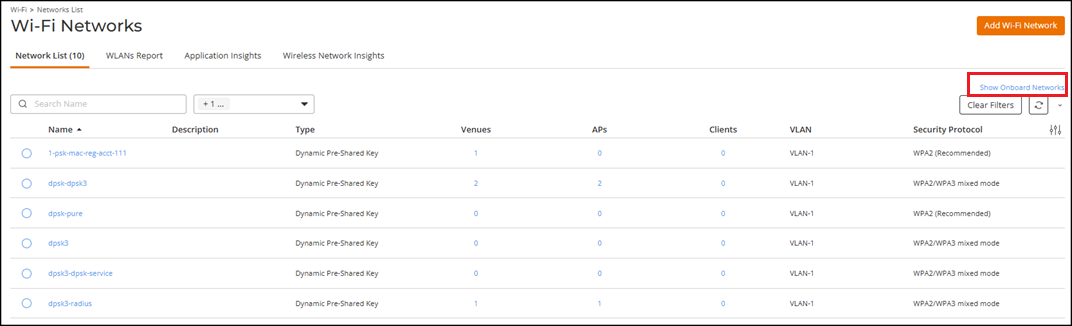
- Click Show Onboard Networks to display onboard
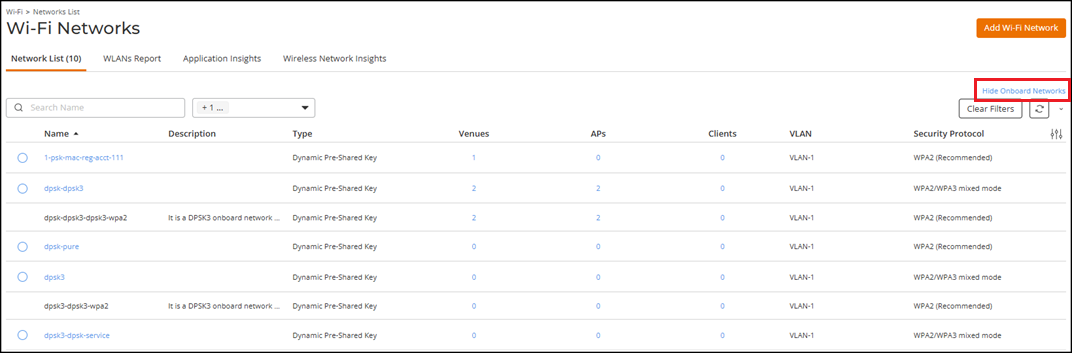
networks.Each onboard network appears as a separate row below the associated service network.
- Review the onboard network entries:
- Name: Displays the network name assigned by the system. The value is not clickable for onboard networks.
- Description: Provides onboard‑specific context, indicating that the onboard network is not configurable and must be managed through the associated service network.
- Type: Displays the network type.
- Venues, APs, and Clients: Displays the number of associated venues, access points, and clients for the onboard network.
- (Optional) Click Hide Onboard Networks to suppress displaying the onboard networks in the table.