Resetting a PoE Switch Port Using Power Cycling
You can enable or disable a PoE port on an
ICX switch using the Cycle PoE option in the RUCKUS One web interface.
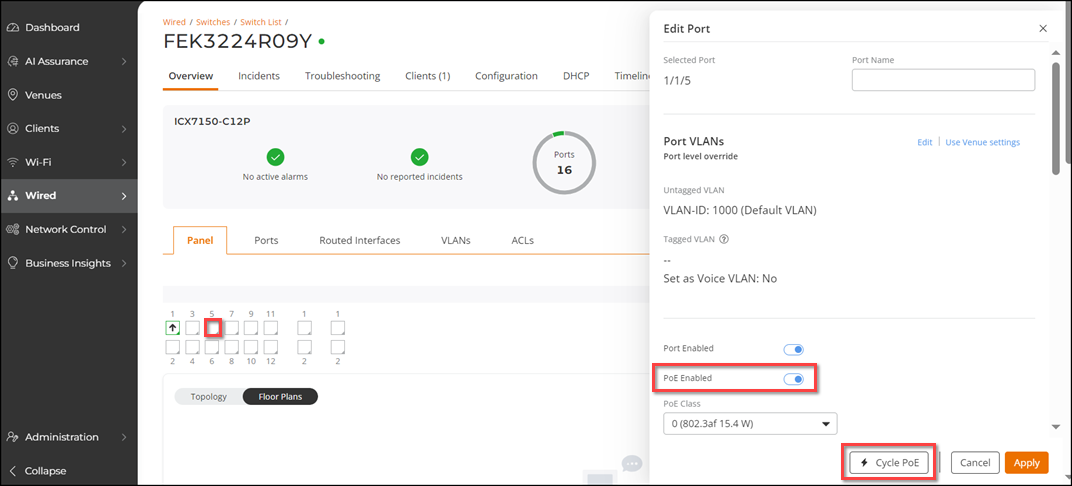
- From the navigation bar, select Wired. Under Switches, select Switch List.
- In the Switch
List page, click the name of a specific ICX switch.The Overview page is displayed.
- In the Panel tab, click on a port. The Edit Port sidebar is displayed. Scroll down to the PoE settings.
- (Optional) Click the Port Enabled
toggle to ON. Attention: Disabling an uplink port will result in network termination for this switch.
- Click the PoE Enabled
toggle to ON and click Cycle PoE. A success message is displayed that the port is
power cycled.
Regarding the behavior of power cycle operation on single and multiple PoE-enabled ports, refer to the Considerations section in Power Cycle a Switch Port by PoE.
show logging | include PoE from the User
EXEC mode. "Power enabled” log entry will appear only for the port that has a Power
Device (PD) connected to it.You may navigate to to view the entry for this action, such as the date and time of the action, and whether it was a success or failure.