Setting the AP Management VLAN ID for a Venue
The Management VLAN is used to segregate
the management traffic between an AP and RUCKUS One. Using the AP Management
VLAN setting, you can set the VLAN ID for all APs associated with a venue.
Note: Verify that the configuration of the uplink switch is
correct before attempting to change the AP management VLAN ID. By default, the
Management VLAN ID for a venue is set to 1.
- On the navigation bar, click
Venues.The Venues page is displayed.
- Click the check box for the specific Venue name, then click Edit. Alternatively, click the specific Venue name, then click Configure.
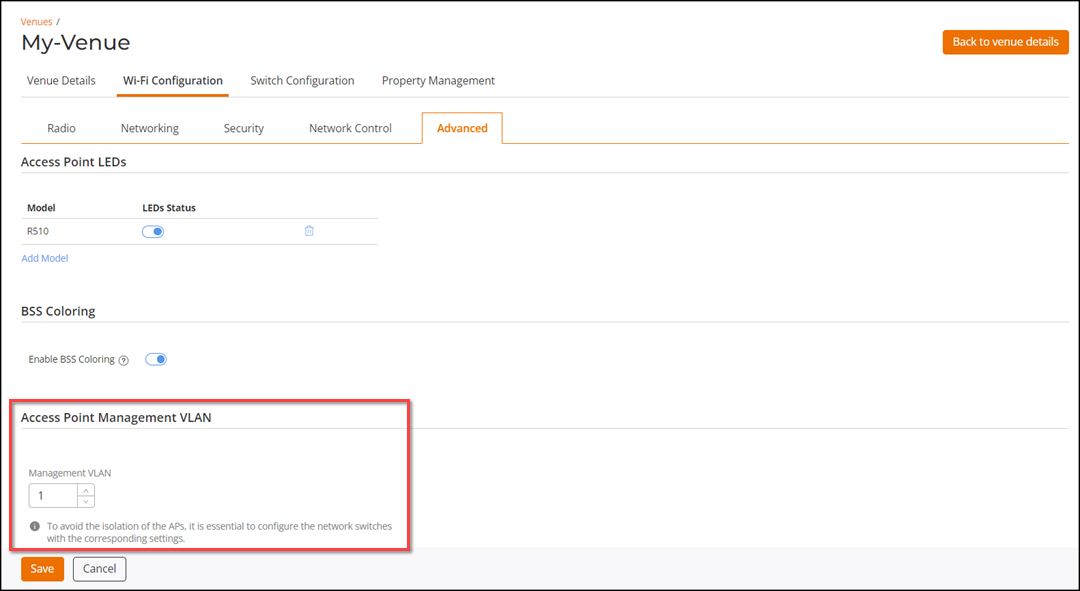
- Select the Wi-Fi Configuration tab and then select the Advanced sub-tab.
- Click Access Point Management VLAN.
- In the Management
VLAN, enter the VLAN ID, or use the arrows to select the new VLAN
ID.The VLAN ID must be between 1 through 4094.Note: To avoid the isolation of the APs, it is essential to configure the network switches with the corresponding settings.
- Click Save.Note: A confirmation message is displayed only if there is a change in the AP Management VLAN setting or if an AP using the venue's AP Management VLAN setting is moved to another venue having a different Management VLAN setting.
 icon and select the