Wi-Fi Networks Configuration Overview
From the main menu, select . The Wi-Fi Network window is displayed.
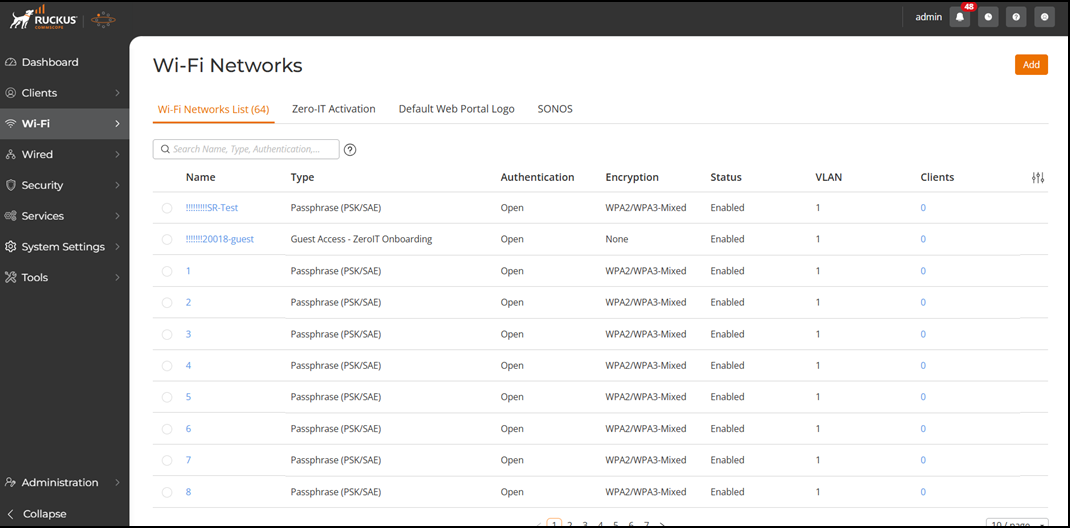
You can view the following information and options from the Wi-Fi Network List page:
You can customize which fields must appear
in the Wi-Fi Networks table by clicking the  icon and selecting or deselecting
the desired column names. Optionally, you can click Reset to default to have
all columns appear in the Wi-Fi Networks table.
icon and selecting or deselecting
the desired column names. Optionally, you can click Reset to default to have
all columns appear in the Wi-Fi Networks table.
You can search the list of Wi-Fi networks by entering a complete or partial (at least three characters) Wi-Fi network name, type, authentication, encryption, or status in the search field; all matching entries are displayed. You can sort the list ofWi-Fi networks by clicking the associated column header.