Converting an Unleashed Master AP to Dedicated Master
Complete the following steps to convert an Unleashed Master AP to Dedicated Master:
- Checking Whether the Current Active Master AP is an R750, R770, or R850
- Converting an Active Master AP to Dedicated Master
Checking Whether the Current Active Master AP is an R750, R770, or R850
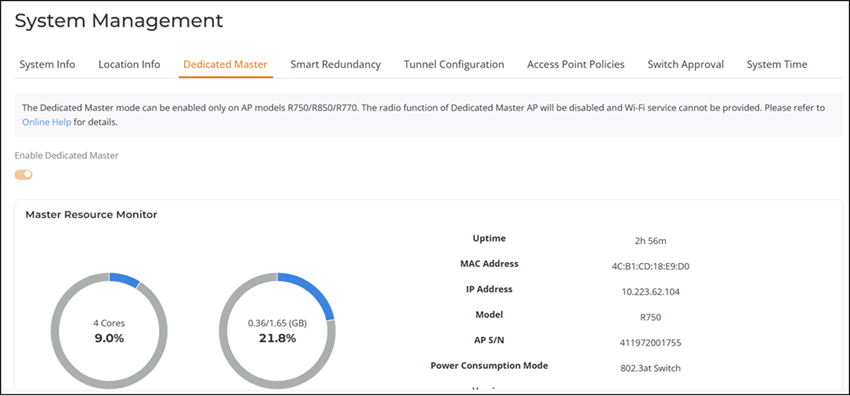
The Enable Dedicated Master option can be enabled only when the current Master AP is an R750 AP, R770 AP, or R850 AP. Otherwise, the system displays the following warning message: "Current Master AP does not support the Dedicated Master mode, please go to System Info → Preferred Master to select the specified AP model as Preferred Master".
For more information, refer to Designating a Preferred Master AP.
If the current Master AP model is not an R750 AP, R770 AP, or R850 AP, the Enable Dedicated Master option appears dimmed.
Converting an Active Master AP to Dedicated Master
- From the main menu, select
and toggle the Enable Dedicated
Master option to on.
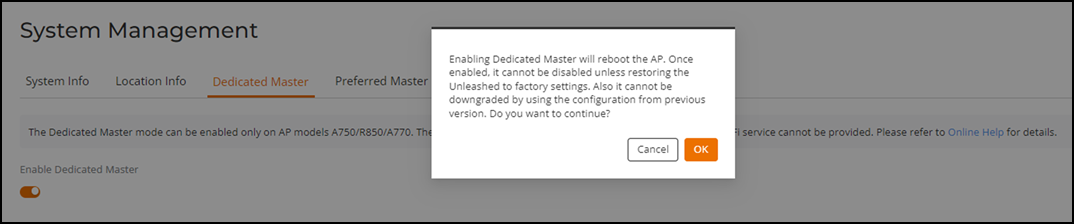
The system displays the following warning message: "Enabling Dedicated Master will reboot the AP. Once enabled, it cannot be disabled unless restoring Unleashed to factory settings. Also, it cannot be downgraded by using the configuration from previous version. Do you want to continue?
- Click OK to reboot the AP.