Additionally, you can disable WLAN service
for this radio entirely by selecting the Enable 2.4 GHz band
checkbox and enabling the Overide Group Config toggle switch to on.
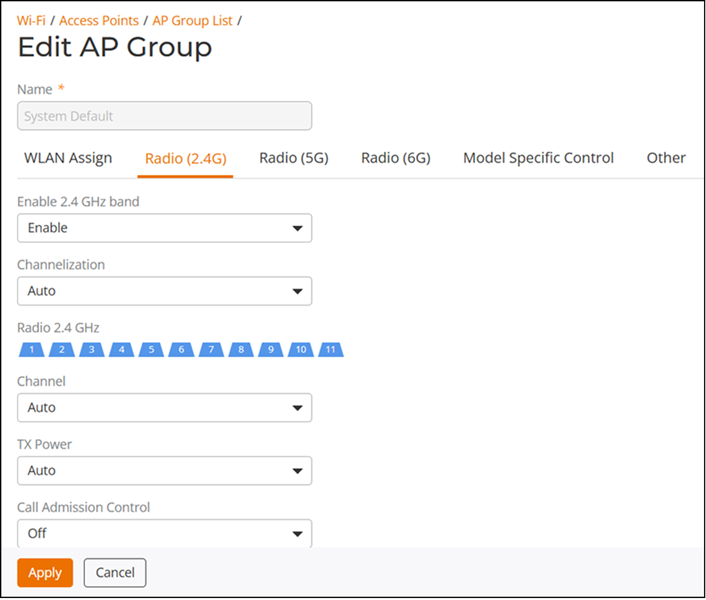
Navigating to the Radio (2.4G) tab for the
System Default AP Group allows you to view and manage the following information:
| Enable 2.4
GHz band |
Allows you to enable or disable 2.4 GHz radio settings on the third
radio in these APs (default is Enabled). |
| Channelization |
Allows selection of channel width for the 2.4 GHz radios (Auto, 20,
or 40). Default setting is Auto
(which is 20 MHz). |
| Radio 2.4
GHz |
Allows selection of the spectrum-specific channels from which to
choose during the automatic channel selection process. |
| Channel |
Allows you to select a specific channel on which to operate.
(Auto allows the system to choose the best available
channel). |
| TX
Power |
Allows you to manually set the transmit power on all 2.4 GHz
radios.- Auto: Default setting that dynamically adjusts
the transmit power of an AP based on real-time conditions
- Full: Maximum allowable transmit power
according to country regulations
- Min: Minimum allowable transmit power according
to country regulations
|
| Call
Admission Control |
Allows you to enable or disable Wi-Fi Multimedia Admission Control
(WMM-AC) to support Polycom/Spectralink Voice Interoperability for
Enterprise Wireless (VIEW) certification (disabled by default). |
| Protection
Mode |
Protection Mode allows control over how 802.11 devices communicate
with another device. Using RTS/CTS (Request to Send/Clear to Send)
reduces collisions and increases network performance if hidden stations
are present. However, RTS/CTS (and CTS-only) introduce overhead and may
reduce the overall performance in some situations. By the proper use of
RTS/CTS and CTS-only, you can fine-tune the operation of your wireless
LAN depending on the physical operating environment.- CTS-only: Choose this option to
force all destination devices to acknowledge their ability to
receive data when a transmission is initiated. Use this option
for compliance with the Wi-Fi Alliance certification.
- RTS/CTS: Choose this option to force
both sending and receiving devices to confirm a data exchange on
both ends before proceeding.
- None: Choose this option to disable
both RTS and CTS acknowledgment.
|
System Default AP Group: 2.4 GHz
Radio Configuration