Configuring Client Isolation Allowlists
When Wireless Client Isolation is enabled
on a WLAN, all communication between clients and other local devices is blocked
at the
access point.
To prevent clients from communicating with other nodes, the AP drops all ARP packets from stations on the WLAN where client isolation is enabled and which are destined to IP addresses that are not part of a per-WLAN allowlist.
You can create exceptions to client isolation (for example, allowing access to a local printer) by creating client isolation allowlists.
Complete the following steps to create a client isolation allowlist.
-
UnleashedFrom the main menu, select .
- In the Wireless Access Control page, click .
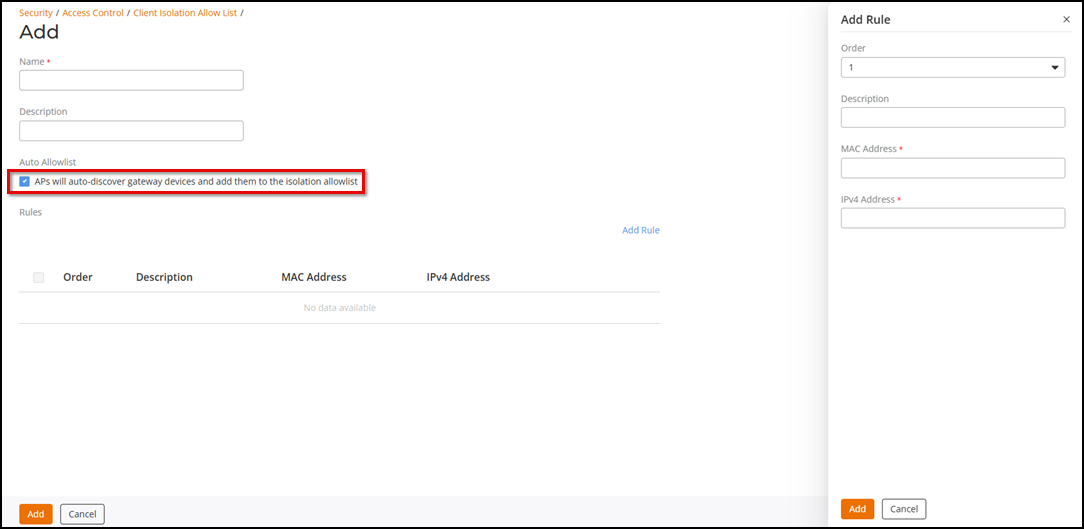
- Enter a name for the allowlist policy, and (optionally) enter a description.
- Select Auto Allowlist checkbox to allow the APs to auto-discover gateway devices and add them to the isolation allowlist. Auto Allowlist is enabled by Default.
- Under Rules, click Add Rule to create multiple device-specific rules for each device to be allowlisted.
- Define each rule by configuring a combination of the following attributes:
- Click Add to add the rule you created.
- To change the order in which rules are implemented, select the order from the menu in the Order column. To delete a rule, select the checkbox of the rule and click Delete.
- Click Add to add the allowlist.