Backing up and Restoring a Switch List
RUCKUS Unleashed ICX switch
management provides tools for performing a backup of the current ICX switch list
and restore
to a previously saved configuration backup file. Use the Backup Switch List and
Restore Switch
List options when you want to reset a switch to factory default settings to
join a new RUCKUS
Unleashed system.
- From the main menu, select .
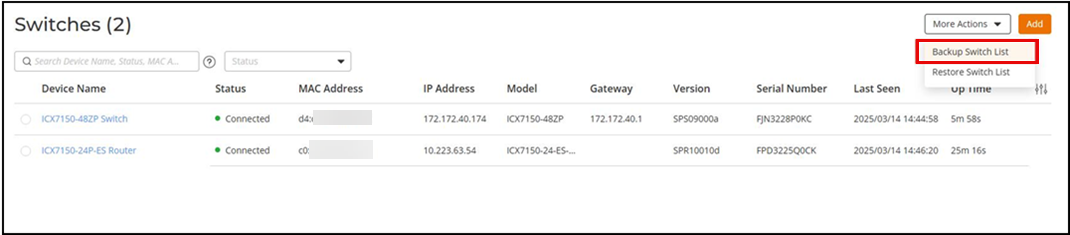
- Click More Actions and click Backup Switch List.
- Save the backup file to a convenient location.
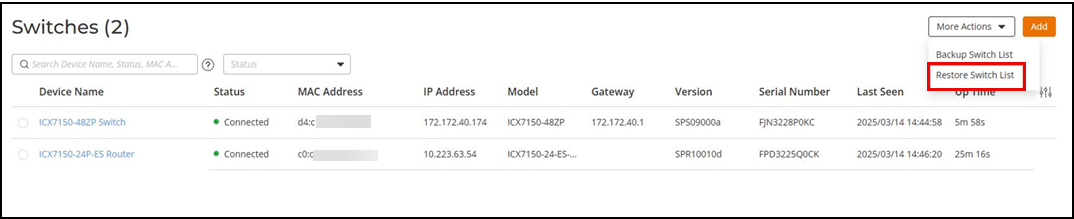
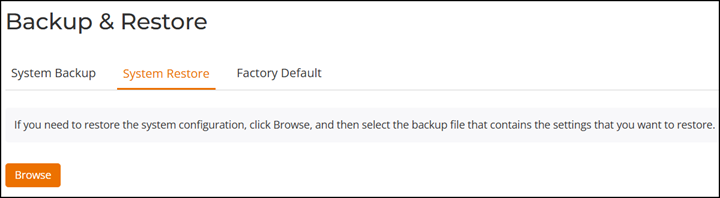
- To restore configuration settings from a previously saved backup file, select More Actions and click Restore Switch List. Alternately, you can restore the switch list from the option. Refer to Backup and Restore for more information.
- In the System Restore option, click Browse and select a valid backup file.
- Click Browse.
- Click OK to
confirm.
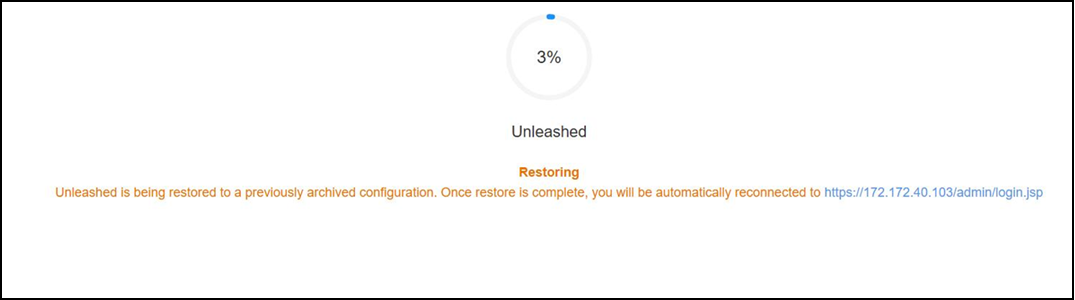
The Restoring screen appears, notifying you that the restore process has begun. A progress bar shows the relative status of the restore process.
Note: The restore process may take 10 minutes or more, during which time the Unleashed network may reboot and go temporarily out of service. Do not manually power off or reboot the switch.When the process is finished, the restored switch list appears when you click the Summary box.