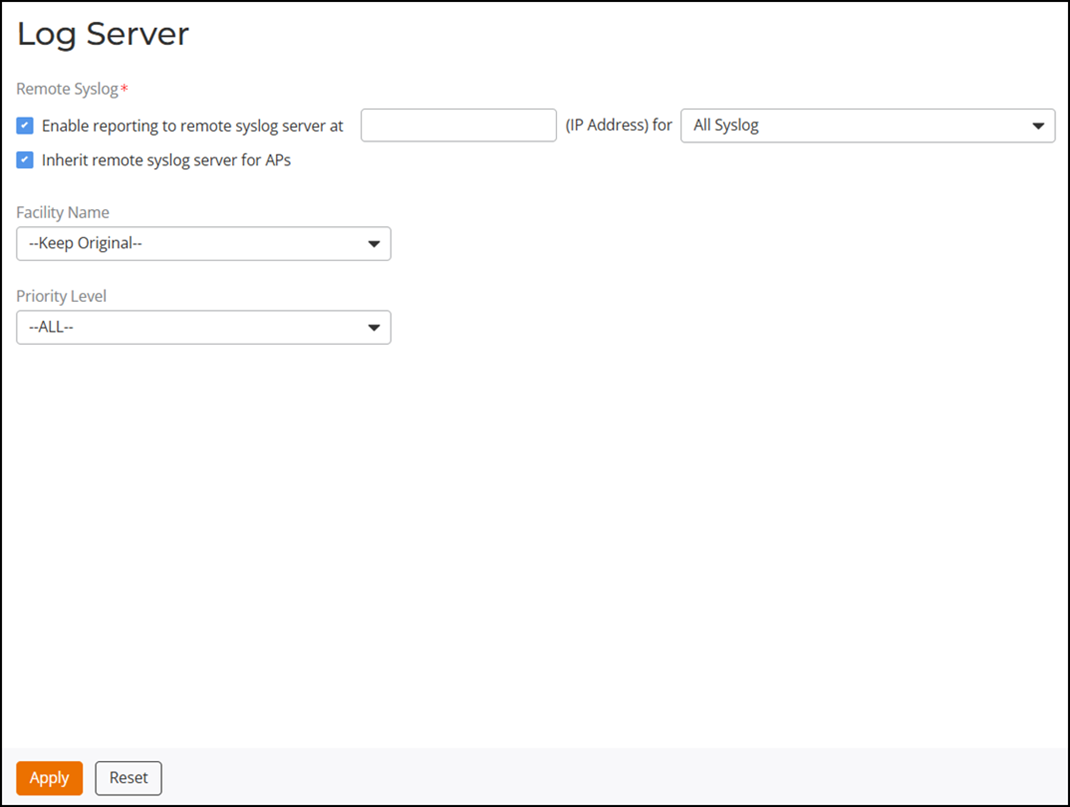
Enabling Log Delivery to Remote Syslog Server
The RUCKUS Unleashed internal log files can be configured for automatic delivery to a remote syslog server.
Complete the following steps to enable log file delivery to a remote syslog server:- From the main menu, select .
- In Log Server, under Remote Syslog, select the Enable reporting to remote syslog server at checkbox, and enter the IP address of the syslog server.
- From the (IP Address) for list, select one of the following options to control the content of the logs:
- (Optional) Enable the Inherit remote syslog server
for APs checkbox.
Enabling this option allows the controller to supply client association information to a third-party application that can deploy ACL policies to a firewall based on client association information such as user name, IP address, MAC address, and so on. First, RUCKUS Unleashed retrieves client association information, reorganizes the information, and sends it to the syslog server, information can be collected by the third-party software and sent to the firewall for access restrictions based on client association information.
- Under Facility Name, select one of the following options:
- For Priority
Level, select one of the following options:
- All: Include all syslog messages.
- Emerg (0), Alert (1), Crit (2), Err (3), Warning (4), Notice (5), Info (6), : Lower numbers indicate higher priority. The syslog server will only receive logs with priority levels that are the same as or higher than the configured level.