Modifying Model-Specific Controls
Some options are available for specific AP models only.
To configure model-specific settings for the AP Group, select the AP model from the Model Specific Control list.
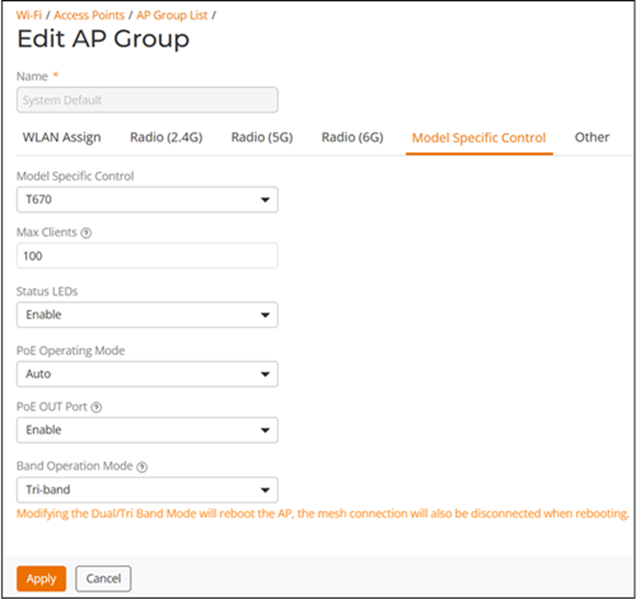
Configure any of the following settings for each model independently, and click Apply to save your changes:
- Max Clients: Set the maximum number of clients that can associate per AP. Note that different AP models have different maximum client limitations.
- PoE Out Ports: (For
specific AP models only.) Enable PoE out ports.
If the controller country code is set to any European Union (EU) country, then the C-band channels (U-NII-3, 5.8 GHz) channels are supported based on specific AP categories and an additional Enable 5.8 GHz Channels option will be available. Enabling the Enable 5.8 GHz Channels option allows the use of restricted C-band channels. These C-band channels are disabled by default and must only be enabled by customers with a valid license to operate on these restricted channels.
C-band Channel Support
- Status LEDs: Disable the external LEDs on certain AP models. This option can be useful if your APs are installed in a public location and you do not want to draw attention to them.
- External Antenna: (For APs with external antennas only.) Enable the external antenna. When enabled, enter a gain value in the range from 0 through 90 dBi. The default value is 3 dBi.
- Port Settings: Refer to Configuring AP Ethernet Ports for more information on configuring AP-specific Ethernet port settings.
- PoE Operating Mode:
Select the PoE operating mode, Auto, 802.3af
PoE, or 802.3at PoE (specific AP models
only). Default is Auto. If 802.3af PoE is selected, the AP
will operate in 802.3af mode (not 802.3at mode), and will consume less power than
in
802.3at mode. However, when this option is selected, some AP features are disabled
to reduce power consumption, such as the USB port and one of the Ethernet ports.
Note: On some APs, an additional mode, 802.3at+ PoE, is available. This mode enables all features on the AP but requires an Ethernet switch that supports the 802.3at+ standard due to the higher power draw from the port to which the AP is connected. For a list of PoE operating modes by AP model, refer to Access Point Power Supply Considerations.
- Band Operation Mode:
The two supported modes are:
- Dual-band: Supports two radios: 2x2:2 in 2.4GHz and 4x4 in 5GHz
- Tri-band: Supports three radios: 2x2:2 in 2.4 GHz, 2x2:2 in 5GHz and 6GHz
Note: The default setting is dependent on the country code associated with the AP; for example, an AP in a country that does not support 6GHz defaults to Dual-band mode.Note: Modifying the Band Operation Mode will cause the AP to reboot, which will also temporarily disconnect the Mesh connection.Note: Band Operation Mode is supported only in the AP models R670 and T670. - Antenna Type: Choose
the required antenna type for this AP. The available options are:
- Sector (default): Uses a 120-degree wide antenna for broad coverage
- Narrow: Uses a 30-degree narrow antenna for focused beam
Note: Antenna Type configuration is supported only on the AP model T670sn.Note: Changing the antenna type will cause the AP to reboot.