Navigating the Dashboard

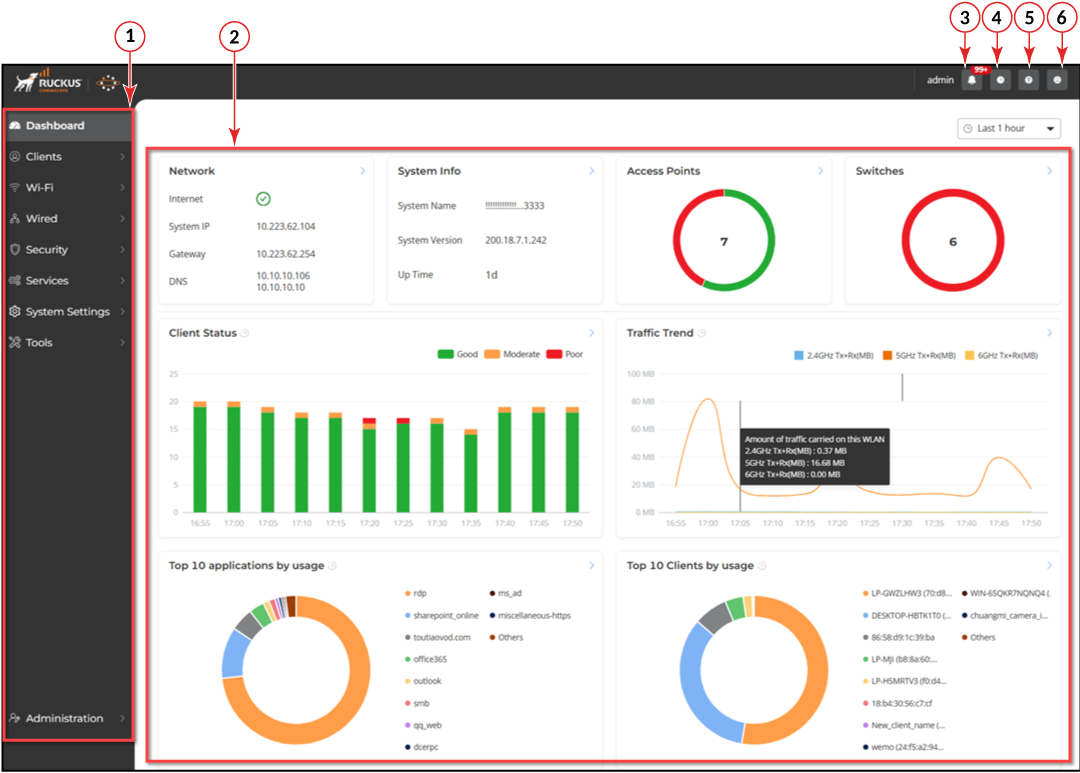
The RUCKUS Unleashed dashboard is the primary interface used for monitoring and configuring all aspects of your network.

Unleashed Web Interface Home Page

Unleashed Web Interface Elements

Number Name Description
1 Main menu Use the navigation bar to navigate through RUCKUS Unleashed web interface that include:
  • Dashboard
  • Clients
  • Wi-Fi
  • Wired
  • Security
  • Services
  • System Settings
  • Tools
  • Administration
2 Content area When you click an item on the navigation bar, the related information displays in the content area. By default, the following information is displayed:
  • Network
  • System Info
  • Access Points
  • Switches
  • Client Status
  • Traffic Trend
  • Top 10 applications by usage
  • Top 10 Clients by usage
3 (Alarms) Indicates alarm notifications along with alarm count.
4 (Events) Indicates events along with the time.
5 (Online Help) Click to view the Online Help documentation for RUCKUS Unleashed.
6 (User) Allows you to change the password and log out of the Unleashed web interface.