Smart Redundancy Setup Through Auto Mode
- Connect the member R750 AP, R770 AP, or R850 AP to the Dedicated Master network.
- Log in to the web interface of Dedicated Master.
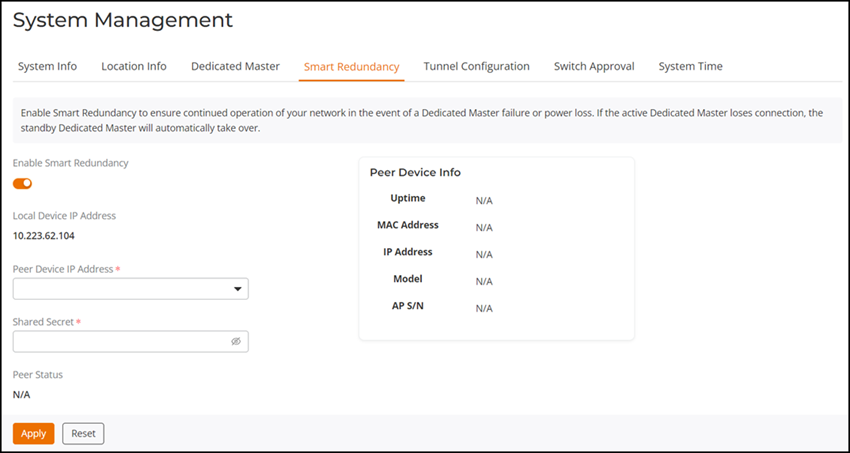
- Select and toggle the Enable Smart Redundancy option.
- From the Peer Device IP
Address list, select the IP address of the member R750 AP, R770
AP, or R850 AP. Click the
 icon to navigate to the
peer device.Note: Only an online root R750 AP, R770 AP, or R850 AP can be selected as a peer device.
icon to navigate to the
peer device.Note: Only an online root R750 AP, R770 AP, or R850 AP can be selected as a peer device. - Click Apply.
The selected member AP syncs the configuration from Dedicated Master and changes to the standby Master AP after reboot.
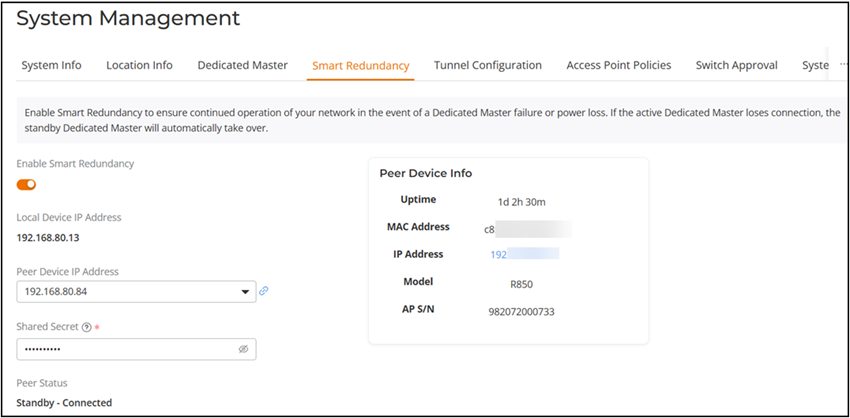
If Smart Redundancy is established successfully, the peer status shows Standby Connected and the details of the peer device are displayed in the Peer Device Info table.
Note: If the active and standby Dedicated Master APs are on different IP subnets, the APs must know the IP addresses of both Master APs to quickly find the active Master AP after a Smart Redundancy failover. You can configure the IP addresses of both devices. Go to . For Dedicated Master Discovery Policy, select the Configure Primary and Secondary Dedicated Master Settings to AP(IP or domain name is acceptable) option, and specify one Dedicated Master AP as primary and the other as secondary. Alternatively, you can also specify the IP addresses of both Dedicated Master APs using DHCP OPTION 43.Note: If you disable Smart Redundancy after it has been enabled, both Dedicated Master APs will revert to the active state, which could result in unpredictable network topologies. Therefore, it is recommended to reset the standby Dedicated Master AP to factory settings before disabling Smart Redundancy.Note: Smart Redundancy supports synchronization of SSL certificate.Note: If an active or standby Master with Smart Redundancy enabled is deployed on different subnets, management IP address must be on a separate management VLAN and both the Masters must be the members of this management VLAN.Note: The member R750 AP, R770 AP, or R850 AP is removed from the AP list when it changes to standby Dedicated Master.