Configuring a Management Interface
The Management IP address can be configured to allow an administrator to manage the
Unleashed network from a single IP address, regardless of which Unleashed AP is currently
the Unleashed Master AP.
The Management IP can be reached from anywhere on the network as long as it is routable by way of the default Gateway configured in IP Settings, then you only have to remember one IP address.
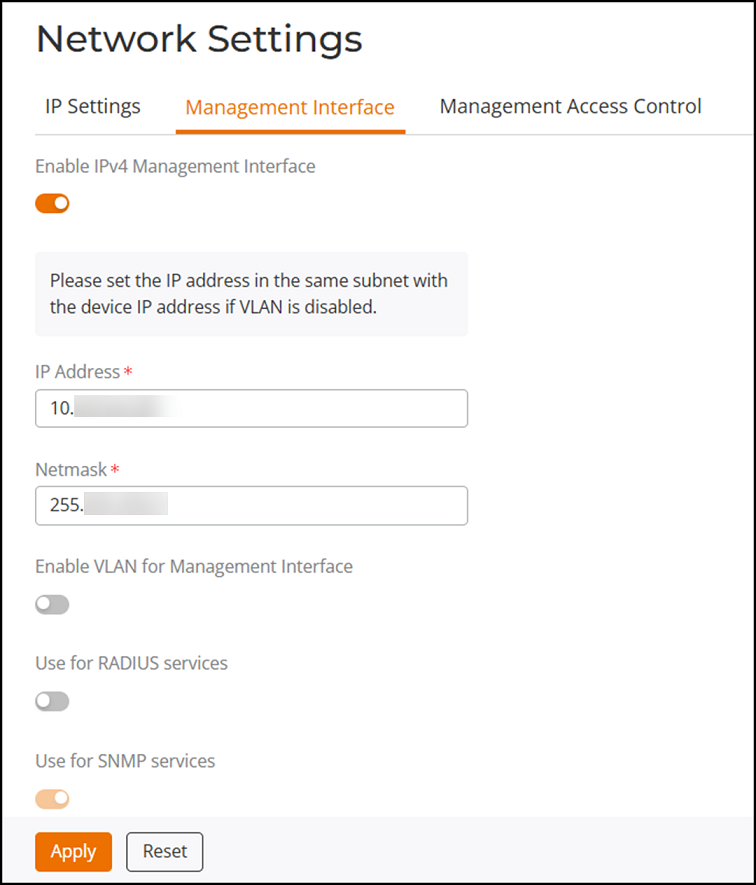
Complete the following steps to configure a Management Interface.
- Select .
- Toggle the Enable IPv4 Management Interface option to on.
- Enter an IP Address and Netmask.
- (Optional) Toggle the Enable VLAN for Management Interface option to on and enter the Access VLAN.
- (Optional) Toggle the Use for RADIUS services option to on to use this IP address for communication with a RADIUS authentication/accounting server. If enabled, the Master AP will send RADIUS packets through this management interface, and the RADIUS server only needs to record one IP address for the Unleashed network. Otherwise, it will record the addresses of all APs.
- The Use for SNMP services services option is automatically enabled when a Management Interface is enabled, and this address will be used for SNMP communications, if enabled.