Other Advanced WLAN Settings
You can configure the Force DHCP, Directed
MC/BC, client logs, Bypass Apple CNA, tunnel mode, and other settings from Advanced
WLAN
settings.
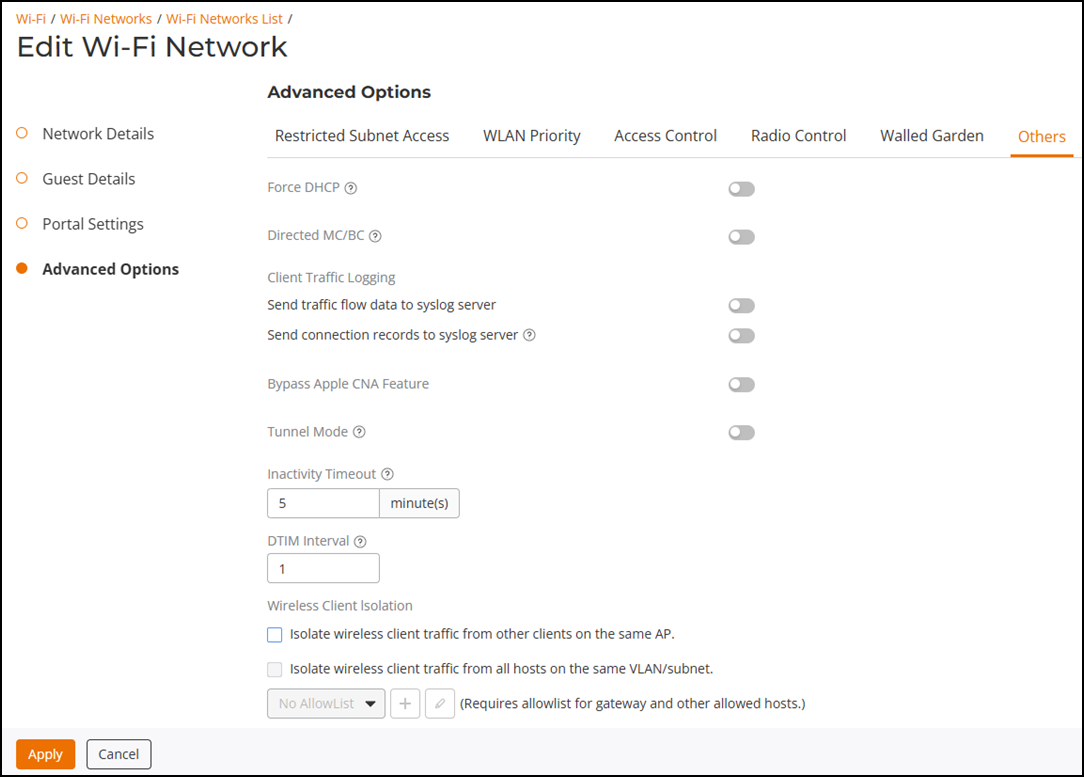
The Others tab provides the following options:
- Force DHCP: (Disabled by default) Enable this option to force clients to obtain a valid IP address from DHCP within the specified number of seconds, thereby preventing clients configured with a static IP address from connecting to the WLAN.
- Directed MC/BC:
Select Enable
and enter a value to set the client count at which an AP will stop converting
group-addressed data traffic to unicast traffic. This setting allows RUCKUS
APs to convert incoming broadcast (BC) and multicast (MC) traffic to unicast,
reducing airtime utilization and improving data throughput performance. If
Directed
MC/BC is enabled, the default threshold value is 5. If Directed MC/BC is
disabled, the threshold value is 1.
Note: During migration from earlier versions (starting from 200.7) to Unleashed 200.15, the following conditions apply:
- If the threshold value is 0 or 1 in the earlier versions, the threshold value will be 1 and Directed MC/BC will be disabled in Unleashed 200.15.
- If the threshold value is between 2 through 10 in the earlier versions, the threshold value will be between 2 through 10 and Directed MC/BC will be enabled in Unleashed 200.15.
- If the threshold value is more than 10 in the earlier versions, the threshold value will be 10 and Directed MC/BC will be enabled in Unleashed 200.15.
- Client Traffic Logging: Configure options for log generation and delivery to the syslog server (refer to Client Connection Troubleshooting):
- Bypass Apple CNA Feature: With Bypass Apple CNA enabled, captive portal (web-based authentication) login must be performed by opening a browser to any unauthenticated page (HTTP) to be redirected to the login page. This option is available when you select Usage Type as Guest Access or Hotspot Service. (Refer to Bypass Apple CNA.)
- Tunnel Mode: Select
this checkbox if you want to tunnel the WLAN traffic back to the Dedicated Master.
Tunnel mode enables wireless clients to roam across different APs on different
subnets. If the WLAN has clients that require uninterrupted wireless connection
(for
example, VoIP devices), RUCKUS recommends enabling tunnel mode.
Note: When tunnel mode is enabled on a WLAN, multicast video packets are blocked on that WLAN; however, multicast voice packets are allowed.
- Inactivity Timeout: Enter a value in minutes after which idle stations will be disconnected (from 1 through 500 minutes).
- DTIM Interval: Configure the Delivery Traffic Indication Message (DTIM) interval to control how often DTIM messages are transmitted. This setting affects the frequency of data transmissions per broadcast beacon. Setting the DTIM interval to a lower value results in more frequent DTIM messages, which can prevent mobile devices from going into power save mode and thereby increasing battery consumption.
- Wireless Client
Isolation: Select the level of client isolation you want to enforce:
- Isolate wireless client traffic from other clients on the same AP: Enables client isolation on the same access point (clients on the same subnet but connected to other APs will still be able to communicate).
- Isolate wireless client traffic from all hosts on the same VLAN/subnet: Prevents clients from communicating with any host on the same subnet or VLAN other than those listed on the client isolation allowlist. If this option is chosen, you must select an allowlist from the list. (Refer to Configuring Client Isolation Allowlists.)