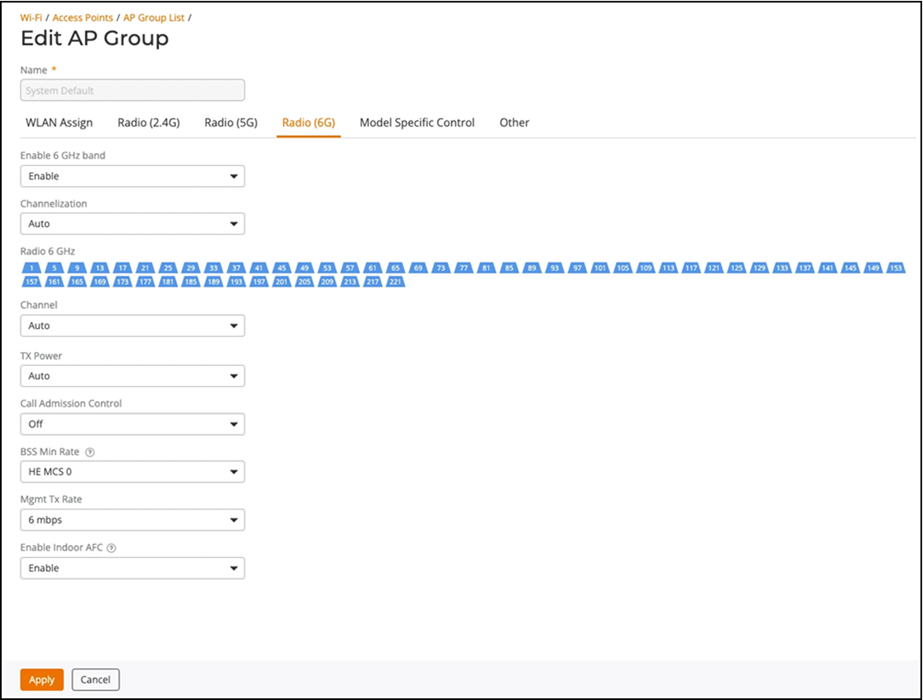
Navigating to the Radio (6G) tab for the System
Default AP Group allows you to view and manage the following information:
The Name field is disabled by default for the System Default AP
Group.
| Enable 6 GHz
band |
Allows you to enable or disable 6 GHz radio settings on the third radio in these
APs (default is Enabled). |
| Channelization |
Allows selection of channel width for the 6 GHz radios (Auto, 20, 40, 80, 160, or
320 MHz). Default setting is Auto (which is 160 MHz). |
| Radio 6
GHz |
Allows selection of the spectrum-specific channels from which to choose during
the automatic channel selection process. |
| Channel |
Allows you to select a specific channel on which to operate.
(Auto allows the system to choose the best available
channel). |
| TX
Power |
Allows you to manually set the transmit power on all 6 GHz radios.- Auto: Default setting that dynamically adjusts the
transmit power of an AP based on real-time conditions
- Full: Maximum
allowable transmit power according to country regulations
- Min: Minimum
allowable transmit power according to country regulations
|
| Call Admission Control |
Allows you to enable or disable Wi-Fi Multimedia Admission Control (WMM-AC) to
support Polycom/Spectralink Voice Interoperability for Enterprise Wireless (VIEW)
certification (disabled by default). |
| BSS Min Rate |
Allows you to configure the BSS minimum transmission rate supported. The default
is HE MCS
0. |
| Mgmt Tx Rate |
Allows you to configure the rate at which control frames are sent. The default is
6
Mbps. |
| Enable Indoor AFC |
Allows you to enable AFC for indoor APs. By default, this option is disabled for
indoor APs. For outdoor APs, the Enable Indoor AFC option
is enabled by default and you cannot disable this option. |
System Default AP Group: 6 GHz Radio
Configuration