To display the inline power statistics, select the unit ID in the Select Stack POE Unit ID list and click
Inline Power Statistics .
The
Inline Power Statistics window is displayed as shown in the figure below.
Monitoring inline power statistics
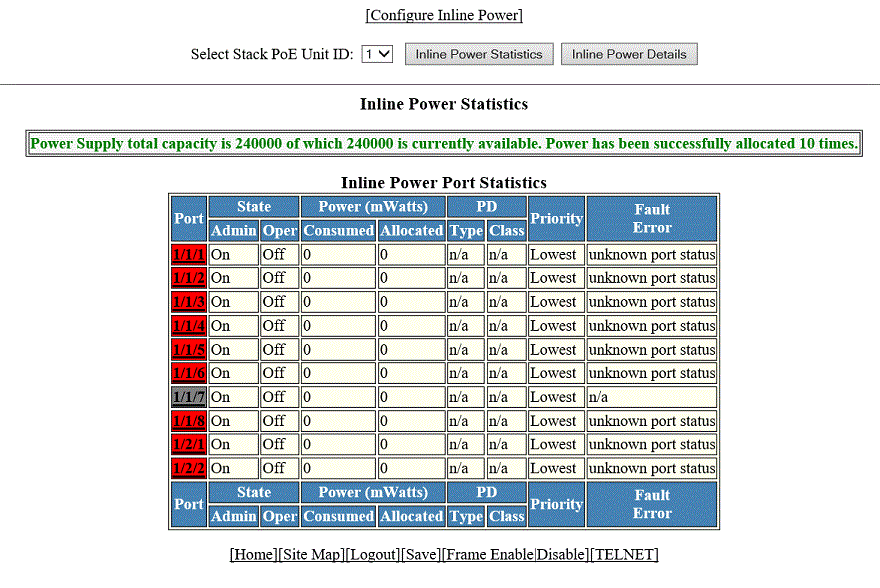
Description of the fields in the Inline Power Statistics window
|
Field
|
Description
|
|
Port
|
Displays the stack port identification of the port as stack#/slot#/port#.
|
|
State: Admin
|
Specifies whether PoE has been enabled on the port, using one of the following values:
-
ON --The inline power command was issued on the port.
-
OFF --The inline power command has not been issued on the port.
|
|
State: Oper
|
Displays the status of inline power on the port, using one of the following values:
-
ON --The PoE power supply is delivering inline power to the powered device.
-
OFF --The PoE power supply is not delivering inline power to the powered device.
-
DENIED --The port is in standby mode waiting for power because currently there is not enough
available power for the port.
|
|
Power (mWatts) Consumed
|
Displays the amount of current (milliwatts) the powered device is consuming.
|
|
Power (mWatts) Allocated
|
Displays the amount of current (milliwatts) allocated to the port. This value is
either the default or configured maximum power level, or the power class that was
automatically detected.
|
|
PD Type
|
Displays the type of powered device connected to the port. This value can be one
of the following:
-
802.3at --The PD connected to this port is 802.3at-compliant.
-
802.3af --The PD connected to this port is 802.3af-compliant.
-
LEGACY --The powered device connected to this port is a legacy product (not 802.3af-compliant).
-
n/a-- One of the following is true:
- The device connected to this port is a non-powered device.
- No device is connected to this port.
- The port is in standby or denied mode (waiting for power).
|
|
PD Class
|
Displays the maximum amount of power received by a powered device. This value can
be one of the following:
-
Class1 --Receives 4 watts maximum.
-
Class2 --Receives 7 watts maximum.
-
Class3 --Receives 15.4 watts maximum.
-
Class 4 --Receives 30 watts maximum.
-
n/a --The device attached to the port cannot advertise its class.
|
|
Priority
|
Displays the inline power priority of the port, which determines the order in which
the port receives power while in standby mode (waiting for power). Ports with a higher
priority receive power before ports with a low priority. The value of priority can
be one of the following:
-
1 --Critical priority
-
2 --High priority
-
3 --Low priority
|
|
Fault Error
|
Displays the fault or error that occurred on the port, if applicable. Otherwise,
n/a is displayed. The value can be one of the following:
-
critical temperature --The PoE chip temperature limit rose above the safe operating level, thereby powering
down the port.
-
detection failed --The port failed capacitor detection (legacy PD detection) because of a discharged
capacitor. This can occur when connecting a non-PD on the port.
-
detection failed --The port failed capacitor detection (legacy PD detection) because of an out-of-range
capacitor value. This can occur when connecting a non-PD on the port.
-
internal h/w fault --A hardware problem has hindered port operation.
-
lack of power --The port has shut down due to lack of power.
-
main supply voltage high --The voltage was higher than the maximum voltage limit, thereby tripping the port.
-
main supply voltage low --The voltage was lower than the minimum voltage limit, thereby tripping the port.
-
overload state --The PD consumed more power than the maximum limit configured on the port, based
on the default configuration, user configuration, or CDP configuration.
-
over temperature --The port temperature rose above the temperature limit, thereby powering down the
port.
-
PD DC fault --A succession of underload and overload states, or a PDDC/DC fault, caused the port
to shutdown.
-
short circuit --A short circuit was detected on the port delivering power.
-
underload state --The PD consumes less power than the minimum limit specified in the 802.3af standard.
-
voltage applied from ext src --The port failed capacitor detection (legacy PD detection) because the voltage applied
to the port was from an external source.
|