Configuring the general system settings
To configure the general system settings, perform the following steps.
- Click Configure on the left pane and select System.
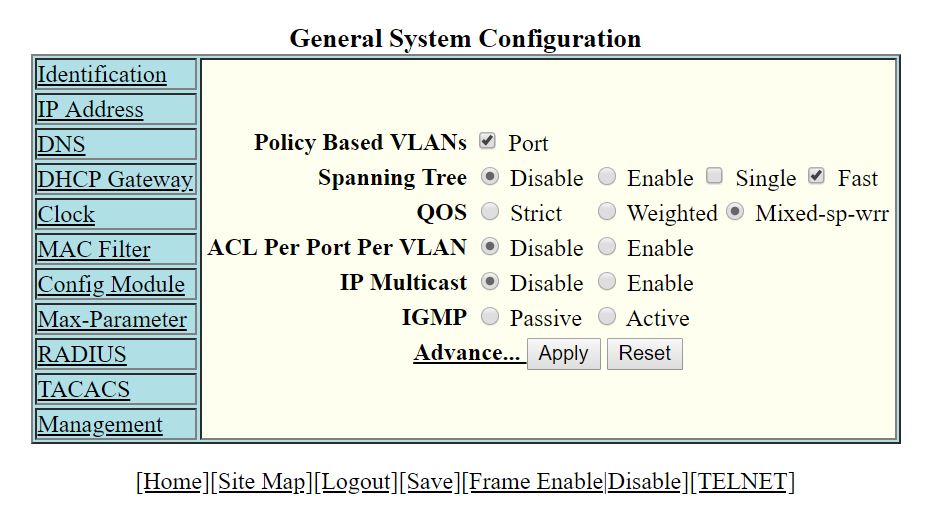
- Click General.
- Select the Port check box for Policy based VLANs to enable configuration of port-based VLANs.
- Click Disable or Enable for Spanning Tree . If you click Enable, select the Single or Fast check box.
- Click Strict or Weighted for QOS.
- The ACL Per Port Per VLAN option is enabled by default in FastIron release 08.0.95 and later releases. Changing the option is not supported.
- Click Advance to configure additional system parameters.
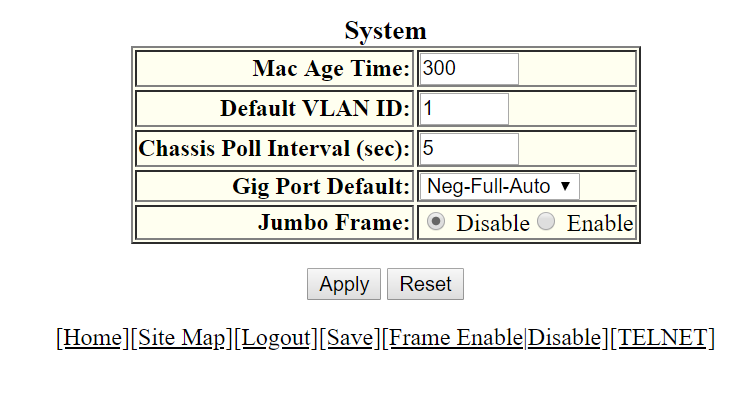
- Type the VLAN tag type in hexadecimal format from 0 through ffff in the Tag Type field. The default is 0081.
- Type the number of seconds a port address remains active in the address table in the Mac Age Time field.
- Type the default VLAN ID number in the Default VLAN ID field.
- Type the interval, in seconds, in which the chassis is polled in the Chassis Poll Interval (sec) field.
- Select a negotiation mode in the Gig Port Default list.
- Click Disable or Enable for Route Only. If you click Enable , Layer 2 switching is disabled globally.
- Click Disable or Enable for Jumbo Frame.
- Click Apply.