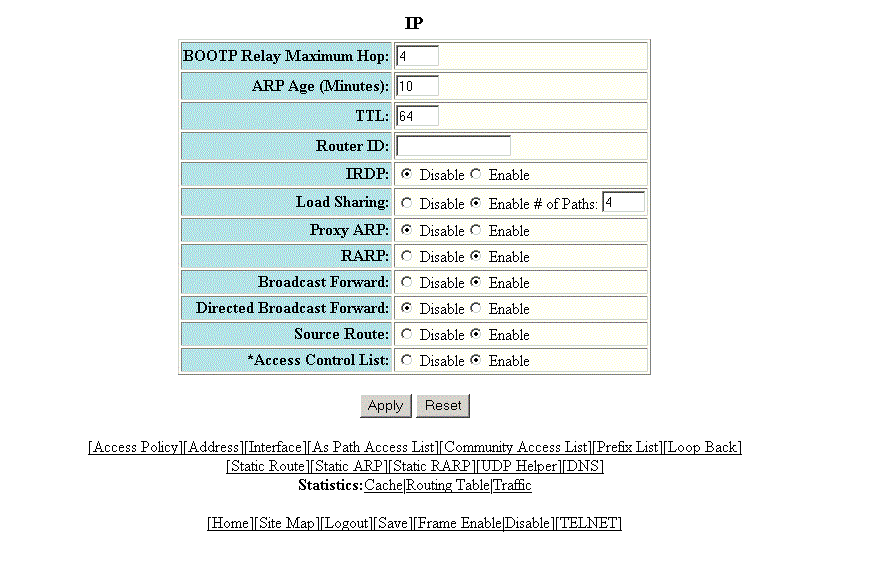
Configuring the general IP settings
To configure the general IP settings, perform the following steps.
- Click Configure on the left pane and select IP .
- Click General .
- Type the maximum number of hops away a BootP server can be located from a Layer 3 switch and still be used by the router clients for network booting in the BOOTP Relay Maximum Hop field. The range is from 1 through 15. The default value is 4 hops.
- Type the amount of time the device should keep a MAC address learned through ARP in the device ARP cache in the ARP Age (Minutes) field. The range is from 0 through 240 minutes. The default is 10 minutes.
- Type the maximum number of Layer 3 switches (hops) through which a packet can pass before being discarded in the TTL field. The range is from 1 through 255 hops. The default is 64 hops.
- Type the Layer 3 switch identifier in the Router ID field.
- Click Disable or Enable for IRDP . By default, this protocol is disabled.
- Click Disable or Enable for Load Sharing . If you click Enable , type the number of load sharing paths in the # of Paths field.
- Click Disable or Enable for Proxy ARP .
- Click Disable or Enable for RARP .
- Click Disable or Enable for Broadcast Forward .
- Click Disable or Enable for Directed Broadcast Forward .
- Click Disable or Enable for Source Route .
- Click Disable or Enable for Access Control List .
- Click Apply .