Changing STP bridge parameters
The table below lists the default STP bridge parameters.
Default STP bridge parameters
|
Parameter |
Default value |
|---|---|
|
Forward Delay |
15 seconds |
|
Maximum Age |
20 seconds |
|
Hello Time |
2 seconds |
|
Priority |
32768 |
To change the default STP bridge values, perform the following steps.
- Click Configure on the left pane and select STP .
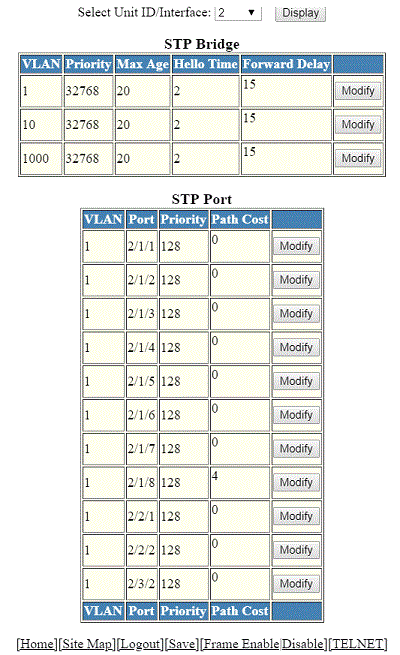
- Select a unit ID in the Select Stack Unit ID list and click Display to display the information about a specific stack unit.
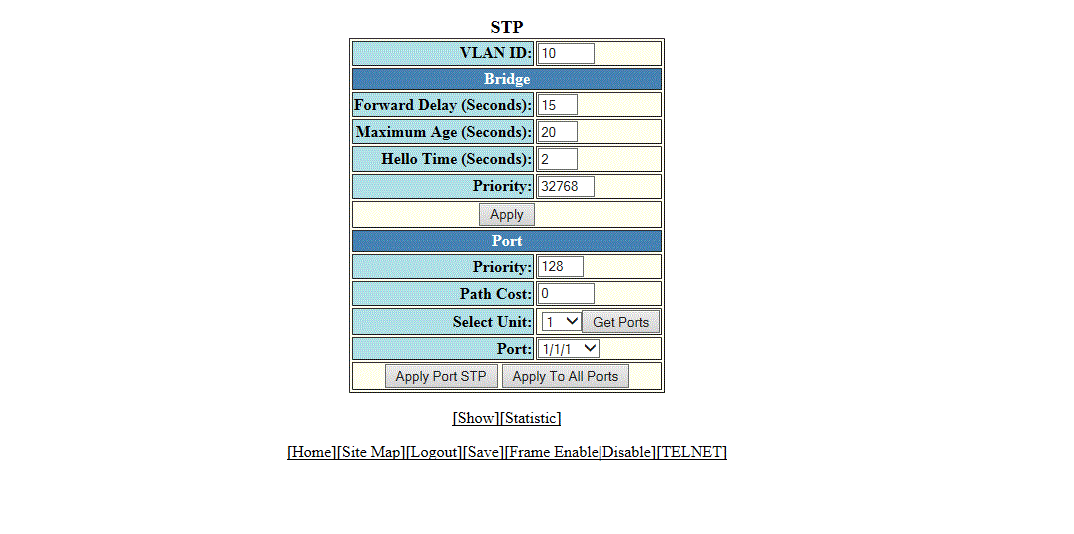
- To change the default values of the STP bridge, click Modify .
- Type the VLAN identifier of the port in the VLAN ID field.
- Type the forward delay time, which is the period of time spent by a port in the listening and learning state before moving on to the learning or forwarding state, in the Forward Delay (Seconds) field. The range is from 4 through 30 seconds.
- Type the maximum amount of time the device waits before a topology change in the Maximum Age (Seconds) field. The range is from 6 through 40 seconds.
- Type the hello time, which is the interval of time between each configuration BPDU sent by the root bridge, in the Hello Time (Seconds) field. The range is from 1 through 10 seconds.
- Type the priority used to identify the root bridge in a spanning tree in the Priority field. The range is from 0 through 65535.
- Click
Apply .
The message The change has been made is displayed and the configured values are displayed in the STP Bridge window. To display the STP Bridge window, click Show . To display STP information, click Statistic . For more information on the field descriptions, refer to Displaying STP information.