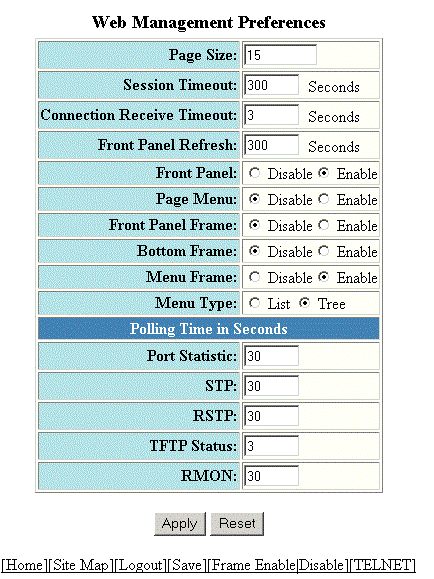
Configuring the web management preferences
To configure the web management preferences, perform the following steps.
- Click Configure on the left pane and select System.
- Click Management and select Web Preference.
- Type the page size in the Page Size field.
- Type the console session timeout value in seconds in the Session Timeout field.
- Type the wait time interval after getting disconnected from the application in the Connection Receive Timeout field.
- Type the number of seconds after which the front panel gets refreshed in the Front Panel Refresh field.
- Click Disable or Enable for Front Panel. By default, it is enabled and the ports are labelled on the front panel of the devices.
- Click Disable or Enable for Page Menu.
- Click Disable or Enable for Front Panel Frame.
- Click Disable or Enable for Bottom Frame.
- Click Disable or Enable for Menu Frame.
- Click List or Tree for Menu Type.
- Type the port statistics polling time in the Port Statistic field.
- Type the STP statistics polling time in the STP field.
- Type the TFTP polling time in seconds in the TFTP Status field.
- Type the polling time for Remote Monitoring in the RMON field.
- Click Apply.