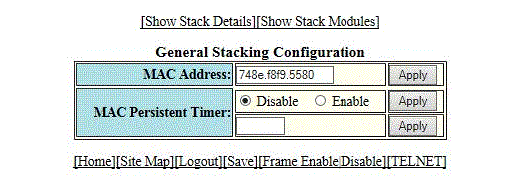
Configuring the general settings for a traditional stack
To change the stack settings to improve performance and reliability of the device, perform the following steps.
- Click Configure on the left pane and select Stack.
- Click General.
- Enter the Media Access Control (MAC) address of the device in the MAC Address field and then click Apply.
- Click
Disable or
Enable for
MAC Persistent Timer and then click
Apply.
If you click Enable, type the time delay before the stack MAC address changes in the MAC Persistent Timer field and then click Apply.
The General Stacking Configuration window provides links to monitor stack parameters:
- To display the current stack information, click Show Stack Details . For more information, refer to the Displaying the stack details.
- To display the current information about the stack modules, click Show Stack Modules . For more information, refer to the Displaying a stack module.
Note: The stack-ports page does not support modification of stack ports. If you click the Modify button, you will be redirected to the Configure Stack Ports page, where Stack-port1 and Stack-port2 will be empty. When you click Apply, an information message 'The change has been made' is displayed but it may not modify the existing stack ports.