Configuring the system DNS
To configure the system Domain Name System (DNS), perform the following steps.
- Click Configure on the left pane and select System .
- Click DNS .
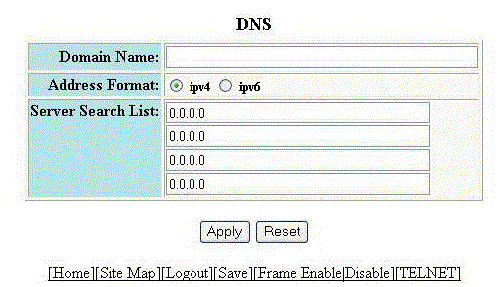
- Type the name of the domain that can be used to resolve host names in the Domain Name field.
- Select ipv4 or ipv6 for the Address Format .
- Type the server IP addresses in the
Server Search List fields.
You can configure a RUCKUS device to recognize up to four DNS servers. The first entry serves as the primary default address. If a query to the primary address fails to be resolved after three attempts, the next DNS address is queried (also up to three times). This process continues for each defined DNS address until the query is resolved. The order in which the default DNS addresses are polled is the same as the order in which you enter them.
- Click Apply .