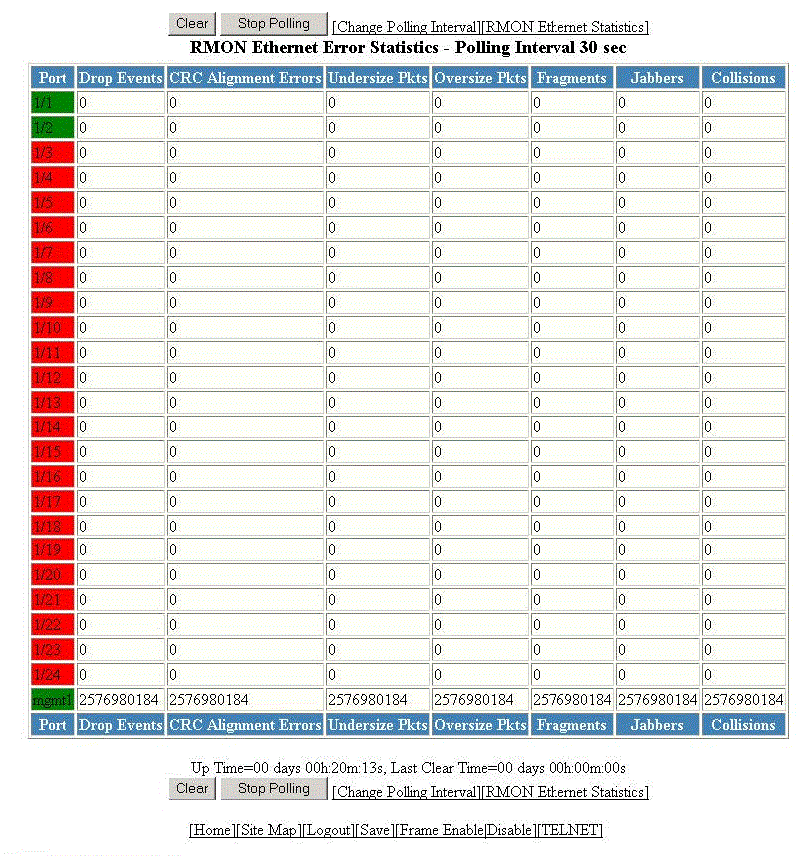
Displaying RMON Ethernet error statistics

To display RMON error information, perform the following steps.

  1. Click RMON Ethernet Error Statistics on the RMON Ethernet Statistics window.
  2. Select a unit ID in the Select Stack Unit ID list and click Display to view information about a specific stack unit.

    The RMON Ethernet Error Statistics window is displayed as shown in the figure below.

    Monitoring the RMON Ethernet error statistics

    Description of the fields in the RMON Ethernet Error Statistics window

    Field

    Description

    Port

    Displays the port number - stack-unit/slotnum/portnum.

    Drop Events

    Displays the total number of events in which packets were dropped by the RMON probe due to lack of resources. This number is not necessarily the number of packets dropped, but is the number of times an overrun condition has been detected.

    CRC Alignment Errors

    Displays the total number of packets received that were from 64 through 1518 octets long, but had either a bad FCS with an integral number of octets (FCS Error) or a bad FCS with a non-integral number of octets (Alignment Error).

    The packet length does not include framing bits but does include FCS octets.

    Undersize Pkts

    Displays the total number of packets received that were less than 64 octets long and were otherwise well formed.

    This number does not include framing bits but does include FCS octets.

    Oversize Pkts

    Displays the total number of packets received that were longer than 1518 octets and were otherwise well formed.

    This number does not include framing bits but does include FCS octets.

    Fragments

    Displays the total number of packets received that were less than 64 octets long and had either a bad FCS with an integral number of octets (FCS Error) or a bad FCS with a non-integral number of octets (Alignment Error).

    It is normal for this counter to increment, because it counts both runts (which are normal occurrences due to collisions) and noise hits.

    This number does not include framing bits but does include FCS octets.

    Jabbers

    Displays the total number of packets received that were longer than 1518 octets and had either a bad FCS with an integral number of octets (FCS Error) or a bad FCS with a non-integral number of octets (Alignment Error).

    Note: This definition of jabber is different from the definition in IEEE-802.3 section 8.2.1.5 (10BASE5) and section 10.3.1.4 (10BASE2). These documents define jabber as the condition where any packet exceeds 20 ms. The allowed range to detect jabber is between 20 ms and 150 ms.

    This number does not include framing bits but does include FCS octets.

    Collisions

    Displays the best estimate of the total number of collisions on this Ethernet segment.

    Up Time

    Displays the length of time the device has been available.

    Last Clear Time

    Displays the length of time data has been accumulating in the current table.

    To remove the current data in the table and restart monitoring, click Clear . To stop reporting the statistics, click Stop Polling .

    The RMON Ethernet Error Statistics window contains the following links: