|
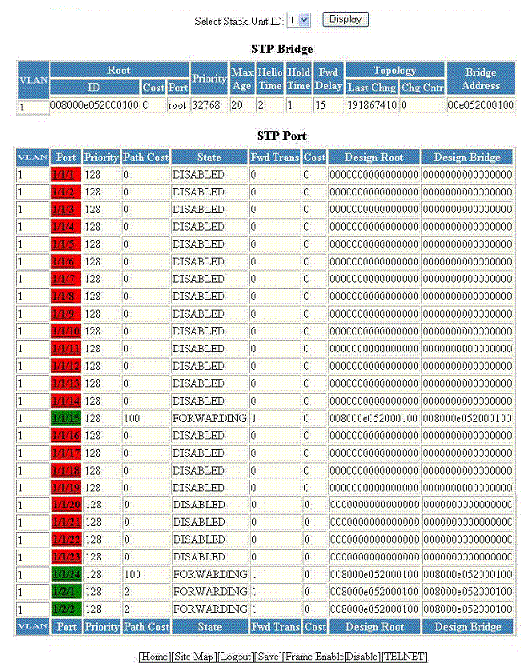
STP Bridge parameters (global parameters)
|
|
VLAN
|
Displays the port-based virtual local area network (VLAN) that contains this spanning
tree (instance of STP). VLAN 1 is the default VLAN. If you have not configured port-based
VLANs on this device, all STP information is for VLAN 1.
|
|
Root ID
|
Displays the ID assigned by STP to the root bridge for this spanning tree.
|
|
Root Cost
|
Displays the cumulative cost from this bridge to the root bridge. If this device
is the root bridge, then the root cost is 0.
|
|
Root Port
|
Displays the port on this device that connects to the root bridge. If this device
is the root bridge, then the value is
root instead of a port number.
|
|
Priority
|
Displays the STP priority of this device or VLAN. The value is shown in hexadecimal
format.
|
|
Max Age
|
Displays the number of seconds this device or VLAN waits for a Hello message from
the root bridge before deciding that the root has become unavailable and performing
a reconvergence.
|
|
Hello Time
|
Displays the interval between each configuration Bridge Packet Data Unit (BPDU) sent
by the root bridge.
|
|
Hold Time
|
Displays the minimum number of seconds that must elapse between transmissions of
consecutive configuration BPDUs on a port.
|
|
Fwd Delay
|
Displays the number of seconds this device or VLAN waits following a topology change
and consequent reconvergence.
|
|
Topology Last Chng
|
Displays the number of seconds since the last time a topology change occurred.
|
|
Topology Chg Cntr
|
Displays the number of times the topology has changed since the device was reloaded.
|
|
Bridge Address
|
Displays the STP address of this device or VLAN.
|
|
STP Port parameters
|
|
VLAN
|
Displays the VLAN that the port is in. This field displays only when port VLAN is
enabled.
|
|
Port
|
Displays the port number - stack-unit/slotnum/portnum.
|
|
Priority
|
Displays the STP priority of the port in hexadecimal format.
|
|
Path Cost
|
Displays the STP path cost of the port.
|
|
State
|
Displays the STP state of the port. The state can be one of the following:
-
BLOCKING --STP has blocked Layer 2 traffic on this port to prevent a loop. The device or VLAN
can reach the root bridge using another port, whose state is FORWARDING. When a port
is in the BLOCKING state, the port does not transmit or receive user frames, but the
port does continue to receive STP BPDUs.
-
DISABLED --The port is not participating in STP. This can occur when the port is disconnected
or STP is disabled on the port.
-
FORWARDING --STP is allowing the port to send and receive frames.
-
LISTENING --STP is responding to a topology change and this port is listening for a BPDU from
neighboring bridges in order to determine the new topology. No frames are transmitted
or received during this state.
-
LEARNING --The port has passed through the LISTENING state and will change to the BLOCKING
or FORWARDING state depending on the results of STP’s reconvergence. The port does
not transmit or receive frames during this state. However, the device can learn the
MAC addresses of frames that the port receives during this state and make corresponding
entries in the MAC table.
|
|
Fwd Trans
|
Displays the number of times STP has changed the state of this port between BLOCKING
and FORWARDING.
|
|
Cost
|
Displays the cost to the root bridge as advertised by the designated bridge that
is connected to this port. If the designated bridge is the root bridge itself, then
the cost is 0.
|
|
Design Root
|
Displays the root bridge as recognized on this port. The value is the same as the
root bridge ID listed in the
Root ID field.
|
|
Design Bridge
|
Displays the designated bridge to which this port is connected. The designated bridge
is the device that connects the network segment on the port to the root bridge.
|